
Workflow Hub

Share your best AI workflow. We could show it to 2M+ people.

Every day, we feature the community's top-voted AI workflow in The Rundown newsletter.

Run Parallel AI Coding Sessions Across GitHub Repos with Markdown

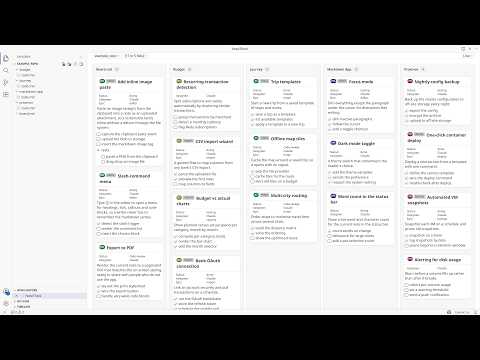
I run nine GitHub repos as one programme of work. Every project keeps its backlog as plain markdown inside its own repo, one Claude Code or ChatGPT Codex session works each project in parallel, and a single board in VS Code shows all of them moving at once. There is no project tool, no API and no sync job in the middle: the markdown file is the shared state that both I and the agents read and write. Step-by-step: 1. Put the backlog in the repo, as markdown. Every project gets `docstech/users/<me>/todo.md` and `done.md`. A story is a `###` heading. Structured fields ride in an empty markdown link at the end of it: `### Add rate limiting [](?status=doing&epic=api&time_estimated=180)`. GitHub renders an empty link as nothing, so the file still reads as prose in a pull request while carrying real metadata. 2. Write the story before the session starts. Each one has goal, background, scope, out of scope, the files it should touch, a checkbox task list, and acceptance criteria. That story is the prompt, and most of my thinking happens there rather than in chat. It decides whether the session comes back with anything shippable. 3. Open the parent folder in one window, and turn the files into a board. I open the parent folder holding all the projects and open any `todo.md` with NoteThink in Folder mode, which merges every markdown file under it into one view. Group the lanes by project and it is the programme view, one lane per repo. Group them by status and it is the delivery view, one Kanban across the whole portfolio. Each card carries a pill naming the project it came from, and clicking it opens that file at that story. 4. Start one Claude Code session per project. Every session opens with the same instruction: read `todo.md` top to bottom and take the top story. The sessions never talk to each other, because the file on disk is the only shared state. A session that dies costs nothing. 5. Let the board report progress instead of reading the sessions. Agents edit the markdown as they work: tick a task, flip `status=todo` to `status=doing`, move a finished story to `done.md`. The board watches the files, so cards animate into their new column as each change lands, and I can see which sessions are advancing without reading any of them. 6. Steer by dragging. Dragging a card between lanes writes the attribute back into the source markdown, so dropping one in "doing" makes the file say `status=doing` and the next agent turn reads it. Ticking a checkbox does the same. The board is the steering wheel and the file is the wire. 7. Close every story the same way. One slash command runs lint plus the full test suite, checks the story's tasks are ticked, and drafts the commit message; another ships to staging then production. The finished story moves to the end of `done.md`. Over time `done.md` becomes the programme record: what shipped, when, and what it cost. Try the board without installing anything. Here is a live example board, four projects merged into one view, and it is exactly what the screenshot shows: https://www.notegit.com/en/app/notegit.com/notegit/example_repo/blob/ai-board/board.md Results, honestly. Nine repos, about 260 open stories and about 1,400 completed ones, all in markdown inside the repos rather than a tracker. The backlog goes back to March 2024; the parallel sessions on top of it are the last four months. I run eight to twelve sessions at the same time, and the whole thing fits inside one Claude Max 20x subscription over a month of full-time work. Not all of it is code. The same parallel-session habit drives a nuclear reactor design study (https://github.com/cleverlight/mistergy) and several video and design projects. The board part fits best where the work already lives as files in a repo. Limits, honestly. The ceiling is my review capacity, not compute. Eight to twelve is where I sit; past that I stop reading output properly and start rubber-stamping, which is worse than running fewer. It only works when stories are genuinely independent, because two sessions in one file is a merge conflict you wrote yourself. Agents occasionally finish work and forget to move the story, so `done.md` needs a sanity check. And it assumes you will write the story properly first, which is real work that AI does not do for you. The screenshot is the public example board rather than my own, because my real one carries client project names. Disclosure: I build NoteThink, the free, open-source VS Code extension in step 3, and NoteGit, which hosts the example board. NoteThink is on the VS Code Marketplace, Apache-2.0, and genuinely early (v0.3.38, preview quality, a handful of installs). The workflow is tool-agnostic and the markdown is just markdown: any viewer will show it, and you can run the whole thing with no extension. NoteThink is what makes the cross-project board and the drag-writes-back-to-file part work.
Alex Stanhope
  • ChatGPT
  • Claude Code
8

Turned my AI coding assistant into a pre-launch security and readiness auditor

Before I ship anything built with AI—whether I use Lovable, Cursor, Replit, or Bolt—I run a security and readiness audit. I ask my AI assistant to clone the free, open-source repo at github.com/edgewiselab/ship-kit and scan my project. It identifies my stack from the code on its own, with no configuration required. The audit checks for 113 known launch mistakes, including open databases, leaked secrets, emails going to spam, missing error tracking, and more. It skips anything that doesn't apply to my app. It generates a plain-English report: green means everything is fine, red means I need to fix something, and amber means I need to confirm it myself. I hand the red items back to my AI assistant to fix, then rerun the scan until the report is clean. The tool is free, MIT licensed, and runs entirely on my own machine. Step-by-step: 1. I ask my AI assistant to clone `github.com/edgewiselab/ship-kit` and scan my project. 2. I let it identify my stack from the code without adding any configuration. 3. I review its checks for 113 known launch mistakes, including open databases, leaked secrets, emails going to spam, and missing error tracking. 4. I review the plain-English report and focus on the red items while confirming the amber items myself. 5. I give the red items back to my AI assistant to fix. 6. I rerun the scan until the report is clean.

Filipe Rodriguez
  • Claude Code
2

Fix Content Hallucinations in an AI News Digest with Make and Claude

My AI digest looked perfect and was quietly wrong. What actually fixed it. Every run succeeded. Every dashboard was green. And the content was still wrong. My digest invented "AI Moat Brief", a newsletter that does not exist. It reported scan counts nobody measured. It resurfaced week-old stories as fresh headlines. Here is what broke, and what fixed it. The sorting used to happen in my head: skimmed subject lines, unopened tabs, quiet guilt. The Signal is one email at 08:00: a single Make scenario calling Claude Sonnet through OpenRouter. It reads the last 24 hours of my RSS feeds and newsletters, keeps what touches what I am actively building plus the domains I need to stay current in, and arrives in the language I actually think in. Core items end with what it means for my work. Five to ten minutes, and I know where to go deep today. Structurally it looks like this, minus the content, rendered in English for this post (Image 1). No real edition is shown; section names and sample lines are illustrative. The dangerous failures were never pipeline failures. They were content failures, and the cause is structural: an LLM summarizing newsletters that already summarize primary sources is third hand by construction. Every hop strips attribution and adds confidence, and when data goes missing the model fills the gap the way LLMs do: fluently. Valid HTML, confident tone, green pipeline, wrong content. Image 2 is that whole failure class in one frame. Three rules closed the gaps I caught, all live in production: Step-by-step: 1. Verbatim or nothing. A source name is copied character for character, and a link exists only if that exact URL is in the input. The model copies; it never composes. 2. The model never generates metrics. Every count the report shows is injected by the pipeline after the model returns. 3. Recycled news gets demoted. A recap of recaps gets one line at most, and is dropped when the underlying story falls outside the collection window. Rules 1 and 3 lean on the prompt, and that is why the counters exist. The pipeline writes a hidden HTML comment into every email it sends: items, links, urls, cost, finish status. That line caught what I could not see. In one run, the published-links counter and the leftover-urls counter read 45 and 435: the only sign a new cleanup step was a silent no-op. Another morning the model stopped at 15,999 tokens against a 16,000 cap, one token from an email cut off mid-sentence. On the morning I wrote this they agreed, 21 links and 21 urls, and boring is the goal. Image 3 is that morning's actual comment, with the same two counters from the no-op run. The run itself has a dead man's switch on Healthchecks.io, so a missing 08:00 email reaches me before I notice. Honest limits: the $0.31 per report is a fresh measurement I am still validating, and I have not proven these rules hold as the source set scales. There is more behind every part of this; I would rather share it where it is wanted. Ask and I will put it in the comments: the three rules in full, the exact cost and what drives it, what this replaced in my day, how it compares to what is on the market, or the ugliest of the 15 documented bugs. I am sharing this because I doubt I am the only one building fragile things behind the scenes, and monitoring text is harder than monitoring uptime. What content-level checks do you run on LLM output, the kind pipeline monitoring cannot see? Real thresholds and embarrassing failures especially welcome.

Ziv Elbaz
  • Claude Code
  • Claude
  • Gemini
  • Gmail
4

Build a Custom Wedding RSVP and Seating Chart Workflow

Every RSVP tool I found wanted a monthly subscription to collect a few hundred yes-or-no answers, and none would return my data in a format I could use. So I built my own with Claude Code. The RSVP system is small: a form deployed on Vercel and embedded into our wedding website. We also emailed the direct link because plenty of guests might never visit the site. The form asks for more than a yes-or-no response. It collects meal choices, dietary restrictions, and plus-ones. Every submission adds a row to a Google Sheet through the Sheets API. That sheet ended up mattering more than the app. Months later, when it was time to create the seating chart, every guest was already represented in clean, structured rows that I could give to a completely different tool. For seating, I opened the same sheet in Claude and wrote out the rules in plain English: who had to sit together, who could not sit anywhere near each other, which relatives needed a quiet corner, and which friends could anchor a table of people who did not know anyone else. Claude produced a first draft that respected those constraints, along with an interactive board where I could drag people between tables. Step-by-step: 1. Tell Claude Code which fields you want on the RSVP form and have it build the front end and back end. Have Claude deploy it to Vercel. 2. Set up a Google Cloud service account, enable the Google Sheets API, and share the sheet with the service account’s email address. Configure each submission to append a row. 3. Embed the form on your wedding website and email the direct link separately. Some people will never open the website. 4. Ask for everything you will eventually need, not just attendance. Your caterer and venue will want meal counts and dietary restrictions, and going back to collect that information later is miserable. 5. When it is time to seat people, point Claude at the same sheet and write your rules in plain language: who must sit together, who cannot sit together, who needs a quiet table, and who can anchor a table of strangers. 6. Have Claude generate a first draft based on those rules, then move people yourself. This works anywhere you have a public form collecting data and a private tool that needs to reason about it. Put a spreadsheet between them instead of building one app that tries to do both. The form stays simple, and whatever you build six months later can read from the same place.

Dean Mazlish
  • Claude Code
4

Turned my company’s business continuity (BCEP) policy into an app that tracks storms, sends SMS updates, and triggers policy actions

I turned my company’s business continuity (BCEP) policy into an app that tracks storms, sends SMS updates, and automatically triggers policy actions. When a storm, tornado, or other emergency is reported within range of one of our office locations, the app sends SMS alerts to affected employees. It also triggers policy actions to prepare for office closures and safety check-ins, while maintaining an audit trail and compliance reporting. Step-by-step: 1. The app monitors reports of storms, tornadoes, and other emergencies within range of our office locations. 2. It identifies the affected employees and sends them SMS alerts. 3. It automatically triggers policy actions to prepare for office closures and safety check-ins. 4. It maintains an audit trail and generates reporting for compliance.

John Duval
  • Claude Code
  • Claude
  • ElevenLabs
3

Built ARENOMICS: A Deterministic Market Arena Where Autonomous AI Minds Compete

I started with a plain-language vision: a world championship where people create autonomous AI minds that compete in simulated markets. I used ChatGPT as a product architect to turn that vision into precise rules, technical specifications, development checkpoints, and tasks that could be completed one at a time. I then used AI coding agents, including Claude Code and Codex, to inspect the repository, write the React and TypeScript code, run tests, identify failures, and explain each completed change in plain language. Determinism and auditability were non-negotiable. Every match uses a reproducible seed, every autonomous mind trades in its own matching engine, and every decision is recorded in an auditable event ledger. After each development cycle, I tested the product, reviewed the interface on desktop and mobile, corrected problems through natural-language instructions, and saved a new canonical checkpoint. I deployed only after the automated tests passed. This allowed me, a 66-year-old self-taught non-programmer, to build a working autonomous-mind competition platform through human vision, AI collaboration, and strict verification. Step-by-step: 1. I defined the vision for a world championship in which people create autonomous AI minds to compete in simulated markets. 2. I used ChatGPT to develop the rules, technical specifications, development checkpoints, and one-at-a-time tasks. 3. I used Claude Code and Codex to inspect the repository, write the React and TypeScript code, run tests, identify failures, and explain completed changes in plain language. 4. I required every match to use a reproducible seed, each autonomous mind to trade in its own matching engine, and every decision to be recorded in an auditable event ledger. 5. After each development cycle, I tested the product, reviewed the interface on desktop and mobile, corrected problems through natural-language instructions, and saved a new canonical checkpoint. 6. I deployed only after the automated tests passed, enabling me to build a working autonomous-mind competition platform through human vision, AI collaboration, and strict verification. Explore the live platform: https://arenomics.com

Steven Alber
  • ChatGPT
  • Claude Code
1

Audit Open Decisions Before Generating Film Shots

Ten days ago, I posted about keeping a `HANDOFF.md` so an AI film project doesn't lose the decisions it has already made. This is the other half, and it turned out to be the expensive one: the decisions that haven't been made yet. Credit where it belongs: Tony Ojeda posted a spec-generator agent that sits between an idea and implementation. The rule I borrowed is his: the agent inspects what already exists before proposing anything. I applied it to film production instead of code. I pointed an agent at my production documents for a short film I hadn't started generating and asked it to identify what was still undecided, what each item affected, and what would break if it were decided late. It came back with ten open decisions. One of them was worth the whole exercise. My environment description is locked verbatim across all 40 shots so the world stays identical. The film is called *The Thaw*. Whether the ice visibly melts during the film is written down nowhere. If I decide that in week three, all 40 keyframes get regenerated at once. I would have found out around shot 12. The counterintuitive part is who writes the list: not me. Asking the person who already has the whole film in their head what's missing gets you very little, because they have all of it—and that's exactly why they can't see the hole. The list has to come from something that only knows what's written down. Step-by-step: 1. I put the open questions in section 0 of the handoff, above everything else, so it's the first thing read and the first thing emptied. 2. I have the agent write that list, not me. It reads every existing document for the project and returns only what it cannot know from them. 3. I have it return three things for each item: what's undecided, which shots it affects, and what breaks if it's decided late. The third column sets the priority. 4. I have it sort by what costs the most to change afterward, not by what's easiest to answer. 5. I keep one hard rule: while an open question affects a shot, that shot doesn't get generated. The question gets decided, or deferred in writing with the cost of being wrong stated. 6. Every answered item leaves section 0 through one of two doors: into the closed canon or into the rejected list. Nothing is simply deleted. 7. I ask specifically about the things that go missing every time: the rule of the world; the physical scale of anything impossible, such as whether the character can touch or climb it; any object appearing in more than one shot; screen direction; how it ends; who speaks and in what voice; and the delivery format. 8. When it finds nothing real, it says so. A list padded to look thorough is worse than an empty one. The version I'd used for a year ran at the end of a session and recorded what got decided. Running it at the start, focused on what hasn't been decided, is the same document pointed the other way—and it's the direction that saves money.

Guillermo Gómez
  • Claude Code
3

Use Claude Code and Whisper API to improve Chinese pronunciation and grammar

I’m learning Chinese online and record all my lessons. I asked Claude Code to transcribe the recordings and walked through the process of using the Whisper API with its guidance. Then I asked Claude Code to analyze the transcripts and identify mistakes I could fix that would make a big difference. It found that my teachers had not corrected several phrases I was repeating. Claude Code taught me which phrases to practice, and I’m now making fewer mistakes. Step-by-step: 1. I recorded all of my online Chinese lessons. 2. I asked Claude Code to guide me through transcribing the recordings with the Whisper API. 3. I asked Claude Code to analyze the transcripts for mistakes that would make a significant difference if corrected. 4. I reviewed the repeated phrases my teachers had not corrected. 5. I practiced the phrases Claude Code identified, which helped me make fewer mistakes.

Kevin Ai
  • Claude Code
3

Build a self-improving ad scriptwriting system

I connected Claude Code to Apify's API to scrape high-performing content from IG/TikTok for ad creative inspiration, and to ElevenLabs' API to automatically transcribe videos — so I can analyze not just visuals, but the exact hooks, pacing, and language top creators are using. From there, I developed a scriptwriting system that takes rough thoughts on a hook and angle and turns them into ad scripts, drawing inspiration from winners and applying proven copywriting principles. After generating, it also grades itself against a 12-point rubric. If it doesn't score at least 90%, it rewrites until it does. I then feed it back in and say, "This is the final version." It analyzes the changes I made and updates its understanding of my style. Step-by-step: 1. I connected Claude Code to Apify’s API for collecting high-performing Instagram and TikTok content. 2. I connected ElevenLabs’ API so the workflow could automatically transcribe each video. 3. I analyzed the winning examples for their hooks, pacing, visual patterns, and exact language. 4. I fed the system a rough hook and angle and had it draft ad scripts using those proven patterns. 5. I created a 12-point grading rubric and required a rewrite whenever a script scored below 90%. 6. After making my own final edits, I fed the approved version back into the system so it could learn my style.

Rishi Lalwani
  • Claude Code
  • Apify
  • ElevenLabs
1

Turn Claude Code Into a Self-Service Data Analyst

Getting answers from company data usually requires someone who knows SQL, understands the database, and has enough business context to interpret the results. This creates a bottleneck: business users depend on analysts for questions they should be able to explore themselves. I turned Claude Code into a self-service data analyst by giving it direct, read-only database access and configuring its behavior through a `CLAUDE.md` file. The file gives Claude business context, explains which analytical tables contain different types of information, tells it how to investigate questions, and defines how results should be presented. Users can then ask business questions in plain English. Claude determines what data it needs, queries the database, investigates the results, creates visualizations, and explains what it found. Step-by-step: 1. Create a dedicated analysis folder and add a `CLAUDE.md` file that defines how Claude should operate as a data analyst. 2. Give Claude enough business context to understand the company, its terminology, important metrics, and how the business operates. 3. Document which analytical tables or views it should use for different types of questions. Curated analytics tables work particularly well because Claude doesn't need to decipher the entire production database. 4. Give users read-only database permissions and explicitly instruct Claude to perform read-only operations, such as `SELECT` queries only. Never give the agent permission to modify production data. 5. Tell Claude how to use the command line to query the database. Include instructions to help users install or configure it if it isn't available. 6. Define an analytical process for Claude to follow. Rather than simply generating one SQL query, instruct it to investigate the user's question, examine the results, and run additional queries when necessary to understand what is happening. 7. Define the expected output: answer the question, explain the important insights, and create appropriate visualizations to make the findings easy to understand. 8. Open the folder in the Code tab inside the Claude Desktop app, which I find to be the best interface, and ask questions naturally, such as, "Why did revenue decline last month?" Claude handles the investigation from there. Instead of building and maintaining a custom analytics application, you can turn a general-purpose AI coding agent into a capable self-service analyst with access to your existing data warehouse. Users ask questions in plain English while Claude handles the SQL, investigation, visualization, and explanation, giving nontechnical users a more direct way to explore company data.

Tony Ojeda
  • Claude Code
0

Build a Locator Map Web App with Claude Code, Codex, and Perplexity

Sometimes a story needs a simple locator map to show where something happened or where something can be found—such as a business facility, a car accident, or the best place to see a sunset. I've worked in media for a long time and understand the power of maps to tell stories. But media cost-cutting and consolidation have reduced the number of available graphic departments, so creating a map is often the last task a reporter or editor wants to take on. I used Perplexity for initial research, Claude Code and Codex to build a web app, and Perplexity and ChatGPT for post-work such as SEO best practices. Step-by-step: 1. I used Perplexity's Deep Research mode to conduct a competitive market analysis. I asked it to analyze the field I was considering entering, identify competitors and growth rates, and explicitly break out feature sets. 2. I revised the research with my own idea and asked Perplexity to run the competitive landscape against it. I also provided desired outcomes, including intended audiences and where competitors were reaching them. I added the constraint, "Do it without syncophancy," so it would stop telling me how good my potential product was. 3. I hand-drew the initial screens and functions I wanted, then used the `/office-hours` skill in the Gstack bundle, available on GitHub, to play devil's advocate, sharpen the ideas, and challenge my assumptions. 4. I wrote a long prompt describing the product, starting broadly with the concept and audience and then narrowing to specific features and benefits. For example, I specified that it should export in 16:9 and 9:16 formats so maps would be ready for mobile vertical presentation. 5. I specified the hosting environment and that the product should be a web app. I also required a planning phase followed by construction phases. I pasted the prompt into Claude Code with this final line: "Use /grill-me to ask me questions to clarify intent." After 147 questions, it started the build. 6. This was in the pre-Fable days, so I specified that Opus 4.8 should act as an orchestrator while less expensive agents, particularly in Codex, handled the actual coding. 7. I used separate phases for technical work such as wiring in mapping providers and getting the UX to work correctly. Other phases included wiring in payment and subscriptions and making sure a subscription triggered an email campaign with instructions. 8. I dedicated an entire phase to building admin tools so I could manage the marketing language on the landing page and publish blog entries. 9. After each phase, I had the Opus/Codex combination perform an adversarial code-review-and-fix cycle. I then ran the `/ai-regression-testing` skill from the ECC repository on GitHub to catch issues the code review missed. 10. After every third phase, I prompted Claude Code: "Act as a senior QA engineer and go through the entire codebase looking for inconsistencies, functions that are in the wrong place, code that is overkill and security vulnerabilities." 11. When I had a product I thought was ready for testing, I prompted Claude Code, again using the Opus/Codex combination: "Act as a senior security engineer. Run this against OWASP standards. Find problems and suggest fixes. Harden this product overall." 12. As I neared the end, I asked Perplexity Deep Research and ChatGPT (Sol/High) to find SEO solutions for the product.

Judd Slivka
  • ChatGPT
  • Claude Code
  • Perplexity
  • Codex
5

Operate Mobile Apps with an AI Agent and Robotic Stylus

AI agents are powerful, but they rarely reach the apps that run daily life. Amazon, Uber, Instacart, Walmart, and DoorDash expose little or no public API access, while simulated input through desktop automation or ADB can leave software fingerprints that anti-bot systems flag. The alternative is to give the agent an arm and an eye and let it operate a phone. The screen becomes the API: a camera watches a real phone, and a robotic stylus taps it. From the phone’s perspective, the input is indistinguishable from a human finger. Nothing needs to be installed, and there is no OAuth setup. Hardware is slower than an API call—each action takes a few seconds—but it can reach virtually any app. Step-by-step: 1. I message the agent like a friend. It has its own phone and its own chat account. 2. The screen lights up, the runtime wakes the agent, and it unlocks the phone and reads my message. 3. The agent works out what I want, opens the right app, and operates it by hand using taps, swipes, and scrolls. 4. If an action involves spending money, the agent pauses and asks for my confirmation. 5. It finishes the task, replies with the result, saves what it learned, and goes back to sleep.

DU DU
  • Claude Code
4

Build a Self-Hosted AI Wine Cellar App with Docker and Claude

I built a self-hosted wine cellar app that runs in a Docker container on my home NAS and doubles as a personal AI sommelier. I add a bottle by taking a photo of its label with my iPhone. A vision model identifies the wine, vintage, region, and grape varieties, while a second model estimates its market value and writes tasting and pairing notes. The app renders a visual map of my rack, so I can see exactly where each bottle is and pull one without hunting. My ratings feed a taste profile built from my own history, which the AI sommelier chat uses to answer questions such as what to open with dinner or which bottles are drinking at their peak. The feature I use most is Scan & Check. When I’m in a store, I photograph a bottle and get a Collection Fit score based on my profile before buying it. The app also exposes an MCP endpoint, so Claude can search my cellar, score a wine, or list my top-rated bottles from any conversation. I built it almost entirely with Claude Code and use it daily from my phone. Step-by-step: 1. I run the wine cellar app in a Docker container on my home NAS. 2. I photograph a bottle’s label with my iPhone when adding it to the collection. 3. A vision model identifies the wine, vintage, region, and grapes, and a second model estimates market value and generates tasting and pairing notes. 4. I use the app’s visual rack map to locate bottles by slot. 5. I rate wines so the app can build a taste profile from my history. 6. I use the AI sommelier chat to choose what to open, including bottles that are drinking at their peak. 7. I use Scan & Check in stores to photograph potential purchases and review their Collection Fit score. 8. I connect to the app’s MCP endpoint so Claude can search my cellar, score wines, and list my top-rated bottles from a conversation.

Ray Toth
  • ChatGPT
  • Claude Code
3

Build a Reddit Signal Agent for Weekly Travel Insights

I’m building an AI travel assistant called SundayAtlas, and I wanted a systematic way to keep learning from what travelers are talking about between individual user conversations. Reddit is useful for this because people are unusually candid about trip-planning frustrations, destinations, bad experiences, and what they wish travel products did better. The problem is volume: I didn’t want to manually read hundreds of posts every week, so I built a Reddit Signal Agent that does the first pass and sends me a weekly travel-insights newsletter. Each week, the workflow collects posts from selected travel subreddits and passes them through an LLM-based classification and analysis pipeline. The report is organized around: - New or intensifying signals - Steady baseline themes - Fading signals - Rising destinations - Competitor mentions - Anomalies unusual enough to warrant attention This week, for example, the agent analyzed 77 posts. It surfaced a spike in discussion around short-term rental restrictions in Tokyo, growing payment friction for travelers in Japan, increased interest in quieter alternatives to heavily touristed Asian destinations, and recurring trust issues involving travel platforms. I use the newsletter as one input into product discovery for SundayAtlas. It gives me a weekly pulse on problems and behaviors that may be worth investigating further, rather than relying purely on my own assumptions about what travelers need. Step-by-step: 1. I collect recent posts from a defined set of travel subreddits. 2. I clean and structure the Reddit data for analysis. 3. I run the posts through an LLM using a defined signal taxonomy. 4. I aggregate the classifications across the weekly sample to identify patterns, changes, and anomalies. 5. I generate the report in a consistent newsletter format. 6. I run the full pipeline automatically with GitHub Actions so a new report is produced each week. I built the agent in Node.js and used Claude Code extensively during development. Evaluation ended up being the most important part. Early outputs looked convincing, but I had no objective way to know whether the classifications were actually good. I manually labeled 91 Reddit posts and created a blind golden dataset, then built a deterministic scorer to compare the agent’s classifications with my labels. The first held-out evaluation scored only 0.23, which gave me something concrete to improve against. I iterated on the classification approach and inspected individual failures. Along the way, I found three separate defects in the data collection pipeline. The held-out score eventually improved to 0.61, while the score across the full dataset increased from 0.33 to 0.67. The finished loop is: Reddit conversations → signal classification → trend analysis → weekly insights newsletter → product discovery for SundayAtlas The golden dataset remains underneath the workflow as a regression test, so when I change the agent, I can measure whether I’ve actually improved it.

Anon Dolphin
  • Claude Code
2

Build a Full-Stack Bot Reaction Engine with Claude and Cost Controls

Faceplant is a real full-stack app, not a mockup. It uses a FastAPI and PostgreSQL backend, a React and MUI frontend, and the Anthropic API (Claude) to power bot replies. The core is the reaction engine. When a human posts, the backend schedules two timed waves of reaction jobs. A background scheduler built with APScheduler polls for due jobs, calls Claude for an in-persona reply, and writes that bot’s comment and like. The 56 personas are stored as data in a roster file. Adding a voice requires only one new entry, so the crowd can scale without additional code. A subset of the personas are GIF-first bots: they ask the model for a caption and search tag, then pull a matching GIF from Giphy. The part I’m proudest of is the honesty layer. Every Claude call is metered and priced, and “The Meter” rolls the data up live with the cost per post, the dollar-per-minute burn rate, and a “spent on nobody” line for bot-to-bot chatter with no human at either end. A “% human” badge drains toward “dead internet” for each thread. The dead-internet loop—bots posting and replying to one another with no human present—is disabled by default and protected by three guardrails: generation decay, a per-thread cap, and a global spend kill switch. Optional cost controls include the Message Batches API at half price and prompt caching for a shared house-style prompt. The whole project is a working demonstration that manufactured engagement is cheap to produce and expensive to mean anything. Step-by-step: 1. I built the app with a FastAPI and PostgreSQL backend, a React and MUI frontend, and Claude replies powered by the Anthropic API. 2. When a human posts, the backend schedules two timed waves of reaction jobs. 3. APScheduler polls for due jobs and triggers Claude to generate an in-persona reply before writing the bot’s comment and like. 4. I keep the 56 personas in a roster file so adding a voice requires only one new data entry. 5. For GIF-first bots, I have the model generate a caption and search tag, then use that tag to pull a matching GIF from Giphy. 6. I meter and price every Claude call, then display live cost per post, dollar-per-minute burn, “spent on nobody” costs, and the “% human” status for each thread. 7. I keep bot-to-bot activity disabled by default and limit it with generation decay, a per-thread cap, and a global spend kill switch. 8. I can reduce costs further with the Message Batches API at half price and prompt caching on a shared house-style prompt.

Ben McOsker
  • Claude Code
  • Claude
4

Automate Short-Term Rental Revenue Briefings with PriceLabs and Claude

My husband and I run a short-term rental business managing two properties we own in Harpers Ferry, WV. A major part of the job is using PriceLabs, a dynamic pricing and revenue management tool that tracks our properties’ performance against the market, including occupancy, prices, and revenue, and recommends price changes when needed. Previously, we had to log in and review multiple dashboards to make informed decisions. Now, every two days we receive a concise morning briefing that summarizes how the month is going and what needs attention. It’s one of the first things I read in the morning, so I know what to adjust in real time. Step-by-step: 1. I connected the data sources Claude needs through MCP connectors: PriceLabs for reservations, pricing, and market data, and Gmail for drafting the output. 2. I wrote the instruction prompt Claude runs each time. This took the most time to develop. 3. I defined the format and length: a short, numbers-first brief of about 200 words, beginning with “How This Month Is Going” and “What Needs Attention,” with no filler or pep-talk tone. 4. I solved delivery by having the routine draft the briefing as an email with a recognizable subject prefix, such as “Iconic Chalet Briefing — Mon, Aug 10.” Because Claude’s Gmail connector can create drafts but not send emails, a separate time-triggered Google Apps Script watches for drafts with that subject prefix and sends them automatically. 5. I registered the workflow as a scheduled Routine. That combination makes the process feel automatic from end to end.

Deborah Dalle Mura Madison
  • Claude Code
4

Use AI to Triage Commercial Vehicle Maintenance Reports

Commercial vehicle maintenance information is often fragmented across driver reports, warning lights, fault codes, inspections, repair records, and vehicle history. This makes it difficult for smaller fleets to decide whether a vehicle can continue operating, requires scheduled repair, or should be stopped immediately. We built TruckFixr Fleet AI to turn an unstructured driver report into a clear, reviewable maintenance action. The workflow begins when a driver submits symptoms, photos, fault codes, and vehicle information through a mobile-friendly form. AI and optical character recognition extract the relevant details and organize them into a structured maintenance case. The report is then evaluated alongside available vehicle history and previous repairs. The workflow provides decision support through three practical actions: continue operating while monitoring, schedule an inspection or repair, or stop and escalate for immediate professional assessment. Final safety decisions remain with authorized fleet or maintenance personnel. After an inspection or repair, the confirmed cause, work performed, and outcome are recorded, creating a more complete vehicle history for future cases. The general workflow can be recreated using a mobile form, OCR, a vehicle-history database, an AI model, automation software, and a human-review dashboard. Step-by-step: 1. A driver submits symptoms, photos, fault codes, and vehicle information through a mobile-friendly form. 2. AI and optical character recognition extract the relevant details and organize them into a structured maintenance case. 3. The workflow compares the report with available vehicle history and previous repairs. 4. The system provides one of three decision-support actions: continue operating while monitoring, schedule an inspection or repair, or stop and escalate for immediate professional assessment. 5. Authorized fleet or maintenance personnel make the final safety decision. 6. After inspection or repair, the confirmed cause, work performed, and outcome are recorded in the vehicle history. TruckFixr has used this approach to support more than 100 vehicle-issue resolutions in early fleet pilots, helping fleets identify problems earlier, prevent avoidable breakdowns, and keep vehicles moving safely.

Rundown Member
  • ChatGPT
  • Claude Code
  • Codex
  • Gemini
2

An immersive 3D website for artists with an AI avatar that welcomes visitors and answers questions in real time

Create an immersive 3D website for artists with an AI avatar that welcomes visitors, answers questions about the artist and artwork in real time, and presents the work throughout the virtual gallery. Step-by-step: 1. Build or download a 3D environment using Claude Code or another suitable development tool. 2. Upload the artworks into the 3D environment. 3. Create a digital avatar, optionally using Adobe Mixamo (free), and import it into the scene. 4. Connect the avatar to an AI language model so it can interact naturally with visitors and answer questions about the artist and the artwork. 5. Give the avatar the ability to point to, manipulate, or present artworks during conversations. 6. Write a detailed artist biography and a description of each artwork. Use this content as the AI avatar’s knowledge base so it can provide accurate, engaging responses. 7. Use open-source voice technologies through Pinokio to enable realistic speech synthesis and voice interaction. 8. Arrange the artworks throughout the 3D environment and optionally display videos on the gallery walls. 9. Configure the audio system so multiple videos do not play sound simultaneously. Audio should activate only when a visitor approaches or interacts with a specific artwork or video. 10. Configure collision detection so the avatar cannot walk through walls or other obstacles. For example, stop the avatar whenever it encounters an obstacle higher than approximately 60 cm (24 inches). 11. Optimize the experience for the web and deploy the website using FileZilla and OVH hosting. 12. Pay special attention to iPhone and iPad compatibility. Apple devices are more sensitive to large assets and memory usage, so it may be necessary to create separate optimized versions for iOS and Android, using compressed models, textures, and videos to ensure smooth performance.

Laurent Leoncini
  • Claude Code
2

Reduced weeks of complex tax research time down to 2–3 hours of HITL

The ETHOS™ Framework (Evaluation Through Hierarchical Oversight of Sources) is a multistage forensic audit system designed to transform AI-generated research into “audit-ready” ground truth. Its five-stage lifecycle is designed to ensure technical precision: Step-by-step: 1. EXTRACT (Stage 1): Using the Ground Truth Manifesto and the six-tier Authority Ladder, ETHOS extracts structured tax reports from multiple LLM archetypes: Technical Specialists, Strategic Advisors, and Operational Drafters. This forces their initial findings to follow a strict legal hierarchy. 2. TEST (Stage 2): The Tax Citation Auditor subjects the reports to a three-pass forensic review, testing every citation for existence, pinpoint accuracy, and application fit. Any citation that cannot be verified in a primary repository is immediately downgraded or flagged. 3. HEAL (Stage 3): The Post-Audit Correction Protocol (PACP) repairs the evidence chain by requiring the LLM to resolve flagged citations, replace fabrications with 3–15-word verbatim micro-quotes, and revalidate all “knock-on” effects across downstream computations and thresholds. 4. ORGANIZE (Stage 4): The Human-in-the-Loop (HITL) controller organizes the pre-audit and post-audit artifacts in a consolidated AI sandbox, such as Google Notebook, Claude Cowork, or Perplexity Spaces. This manages the collectively exhaustive data, elevates mutually exclusive advisory angles, and maintains institutional version control. 5. SYNTHESIZE (Stage 5): ETHOS applies MECE principles (Mutually Exclusive, Collectively Exhaustive) and the Weighted Authority Confidence Index (WACI) to adjudicate model conflicts and synthesize a single ground-truth memo. Every load-bearing conclusion is certified for release.

Travis Call
  • Claude Code
  • Notion
  • Claude Cowork
  • Perplexity Pro
  • NotebookLM
1

Built a complete, free iOS cognitive training app (AllegraMente) solo with Claude Code - 11 exercise areas, 5 languages, no tracking

I built AllegraMente, a complete, free iOS cognitive training app, solo with Claude Code. It includes 11 exercise areas, 83 articles in five languages, and no tracking. My workflow starts with a new feature or content idea, a new exercise type, or an in-depth article about how memory works. Planning and execution stay separate, and the instruction document serves as the contract. Because everything is specified upfront, Claude Code almost never goes off track. Step-by-step: 1. I plan the feature with Claude in chat, define the data models and UX, and fact-check every scientific claim against primary sources before writing anything. 2. I package the result into one self-contained Markdown instruction document containing file paths, specifications, localization keys for all five languages (IT/EN/ES/FR/DE), edge cases, and acceptance criteria. 3. I create a Git restore point. 4. I give the document to Claude Code, which implements the feature end to end using SwiftUI, SwiftData, and MVVM. 5. A small script sends me a Telegram notification when the task is complete. I review the diff and test the app on a device. 6. I ship by creating an archive with `xcodebuild` and uploading it to the App Store with Transporter. This process is how I shipped 11 exercise areas, 83 articles in five languages, and a complete editorial system as a solo developer.

Roberto D'Angelo
  • Claude Code
  • Claude
1