Keep going
Keep learning with Rundown Pro
Pro adds the full on-demand course library, certifications, group office hours, and eligible member perks.
$29/mo, cancel anytime

Guides Claude Code published oct 7, 2026
Claude Code hooks run a command when a chosen event happens, such as a successful file edit. You can use them to format files or run tests without asking Claude to do those jobs each time. Anthropic's hooks guide explains the wider feature.
In this guide, you will build a small shipping calculator, format its settings after a write, and run five checks after selected edits. Then you will introduce one error, see which test catches it, and repair the code.
The example watches Claude's Edit and Write tools for three named files. It leaves shell commands and manual editor changes outside its checks. A failed post-edit check leaves the saved change in place because PostToolUse runs after the tool succeeds.
University Pro members get the prepared project, two hook files, practice prompts, tests, and review checklist from this page. You can also ask Claude to build the example with the instructions below.
A hook links an event to an action. For this task, the event is a successful file edit and the action is a local script. The script formats the settings, runs tests, and reports the result.
We use PostToolUse, which runs after a successful tool call. A check that needs to act before a tool runs belongs under PreToolUse. Anthropic's hooks reference describes the events and their limits.
The practice rule is simple: shipping costs $5 below a $50 order total and $0 at $50 or above. Changing one comparison can break that rule while leaving the code readable and able to run. That gives you a useful error to test.
Use a current Claude Code installation in a terminal, a text editor, and Node.js 22.17.0 or later. This example uses Node's built-in test runner, so there are no extra packages to install. The remediated prepared files were verified with Node.js 24.11.1 on macOS 26.6; the Node 22.17.0 test-runner documentation documents the structured test:summary event used by the helper.
Check your tools in the terminal:
claude --version
node --version
Use your normal Claude Code account and permission settings. The local hook files do not make model or network calls and do not require another AI subscription. Asking Claude to create, edit, or repair files still uses your usual Claude Code access.
Start in an empty practice folder. Review the hook and test code before enabling them. Command hooks run with your full user permissions, and the tests execute project code on your computer. Keep real customer files, secrets, and deployment access out of the exercise.
In an interactive session, Claude Code holds settings-file hooks until you accept workspace trust. Review .claude/settings.json and both hook files first, then trust only this disposable practice folder. Anthropic's hook security guidance explains why that review matters.
| Problem | What to check |
|---|---|
| The hook does nothing. | Check /hooks, workspace trust, the project folder, and whether the edit used Edit or Write. |
| The settings file will not load. | Check /status and strict JSON punctuation, including trailing commas. |
| Formatting works but tests never run. | Remove the format-only argument, then confirm the loaded entry changed. |
| The hook cannot find Node. | Run node --version in the same terminal. Restart after fixing the installation or executable path. |
| Tests fail after an edit. | Read the failed assertion and source code. Repair the code without weakening the test. |
| The check times out or cannot run. | Treat it as an incomplete check. Investigate the runner and use a smaller test scope. |
| A shell command changes a file without triggering this hook. | This matcher covers Edit and Write. Run the checks manually for that change. |
For a private record of what Claude Code runs, start a practice session with:
claude --debug-file hook-debug.logInspect the log after the edit. Keep it private because logs may include local paths and task details. The CLI reference documents the flag.
An organization can restrict which hooks run. Follow its policy rather than changing global permissions to force this example to load. The settings documentation explains managed settings and precedence.
| Your goal | Use |
|---|---|
| Run a known check after a tool call. | A settings hook, as in this guide. |
| Decide which tools or paths Claude may use. | Permission rules. |
| Save the instructions for a task you repeat. | A Skill. |
| Add a custom review dialog, panel, or other interface behavior. | A mod. |
Anthropic documents permissions, Skills, and mods as separate features with some overlap. Choose the smallest setup that fits the task.
Our Claude Code mods tutorial shows a custom review question before selected edits. This guide adds a check after an edit, so you can learn and test each on its own.
Our Claude Code Insights guide helps you identify repeated problems in your coding sessions. When it points to a routine check you keep forgetting, use this hook workflow to test one improvement.
Hooks can make a small check repeatable. You still need to choose useful tests, review changes, and decide when an app is ready for users.
Nate Grahek's Intro to Vibe Coding covers planning, AI coding tools, debugging, deployment, and risks around authentication, payments, and API keys. It teaches the wider development process; this guide supplies the specific hooks exercise.
Create a folder called claude-hooks-practice and open it in your editor. Open a terminal in that folder and start Claude Code:
claudePro members can open the prepared project instead. Its hook stays inactive until you add the settings in Step 2. Read the supplied README before using it.
To build the example yourself, paste:
Create a small practice project in this empty folder. Use Node.js and its built-in test runner. Install no packages and connect no services. Create shipping.json with two values: freeShippingAt is 50 and standardFee is 5. These are fictional USD amounts. Create shipping.cjs. Export a function named shippingFee that reads those settings and returns 5 for an order below 50, or 0 for an order of 50 or more. Use >= for the cutoff. Reject negative totals and values that are not finite numbers with a RangeError. Create shipping.test.cjs with exactly five named tests: 1. settings match the agreed shipping policy: exactly the two values above 2. orders below $50 cost $5 to ship: test an order of 49 3. orders at $50 ship free: test an order of 50 4. orders above $50 ship free: test an order of 75 5. invalid order totals are rejected: test -1, NaN, Infinity, "50", and null Use node:test and node:assert/strict. Do not skip tests. Keep expected results separate from the implementation. Show the files for review. Do not configure hooks, change permissions, or deploy anything yet.
Review the three files. The settings should contain:
{
  "freeShippingAt": 50,
  "standardFee": 5
}
Run the tests in your terminal before adding a hook:
node --test shipping.test.cjsAll five should pass. If one fails, fix the initial project first. Check that the expected results still match the stated shipping rule.
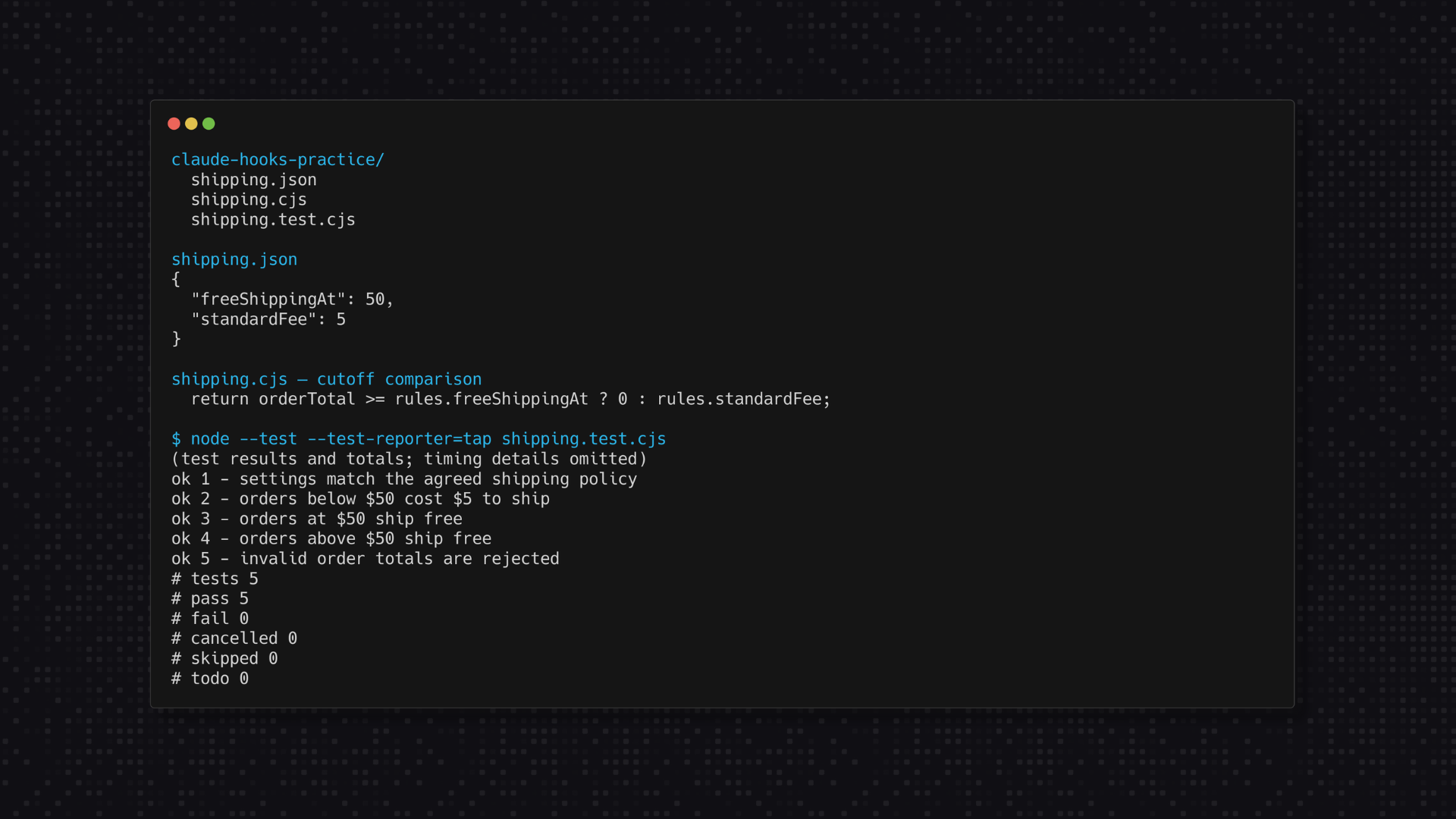
Ask Claude to create the two hook files below. Pro members already have both files and can review them rather than generate another version.
Create two local practice files:.claude/hooks/after-edit.cjsand.claude/hooks/run-shipping-tests.cjs. Use only Node.js built-ins. Create the files without enabling them yet. In after-edit.cjs, read the hook event as JSON from standard input. Handle only PostToolUse for the built-in Edit and Write tools. Read tool_input.file_path and require an absolute path. Use the project containing the hook as the root. Handle only its shipping.json, shipping.cjs, and shipping.test.cjs files. Ignore other paths. Refuse missing files, symbolic links, hard links, and files larger than 64 KB. Do not scan other folders. When shipping.json changes, parse it and write the same values with two-space indentation and a final newline. Leave JavaScript formatting alone. If JSON is invalid, report the error without replacing its text. Support --format-only, which skips all tests. Otherwise, finish formatting first and start the fixed run-shipping-tests.cjs helper with process.execPath, no shell, a 10-second timeout, and bounded output. In run-shipping-tests.cjs, use node:test run() for only shipping.test.cjs, with isolation set to none and concurrency false. Read documented test:fail and test:summary events and print one structured JSON result. Do not parse human-readable TAP or discover another test command. Require at least five tests with no failures, skips, cancellations, or todos. On success, after-edit.cjs should print only valid hook JSON with a systemMessage that reports the number of tests passed. On failure, write a bounded error and structured failure details to stderr and exit 2. Say the edit has already saved. Never undo an edit, weaken tests, approve tools, install packages, or make network requests. Show both files and explain what they read, change, and execute. Do not edit any settings file until I approve.
The resulting layout should include:
claude-hooks-practice/
  shipping.json
  shipping.cjs
  shipping.test.cjs
  .claude/
    hooks/
      after-edit.cjs
      run-shipping-tests.cjs
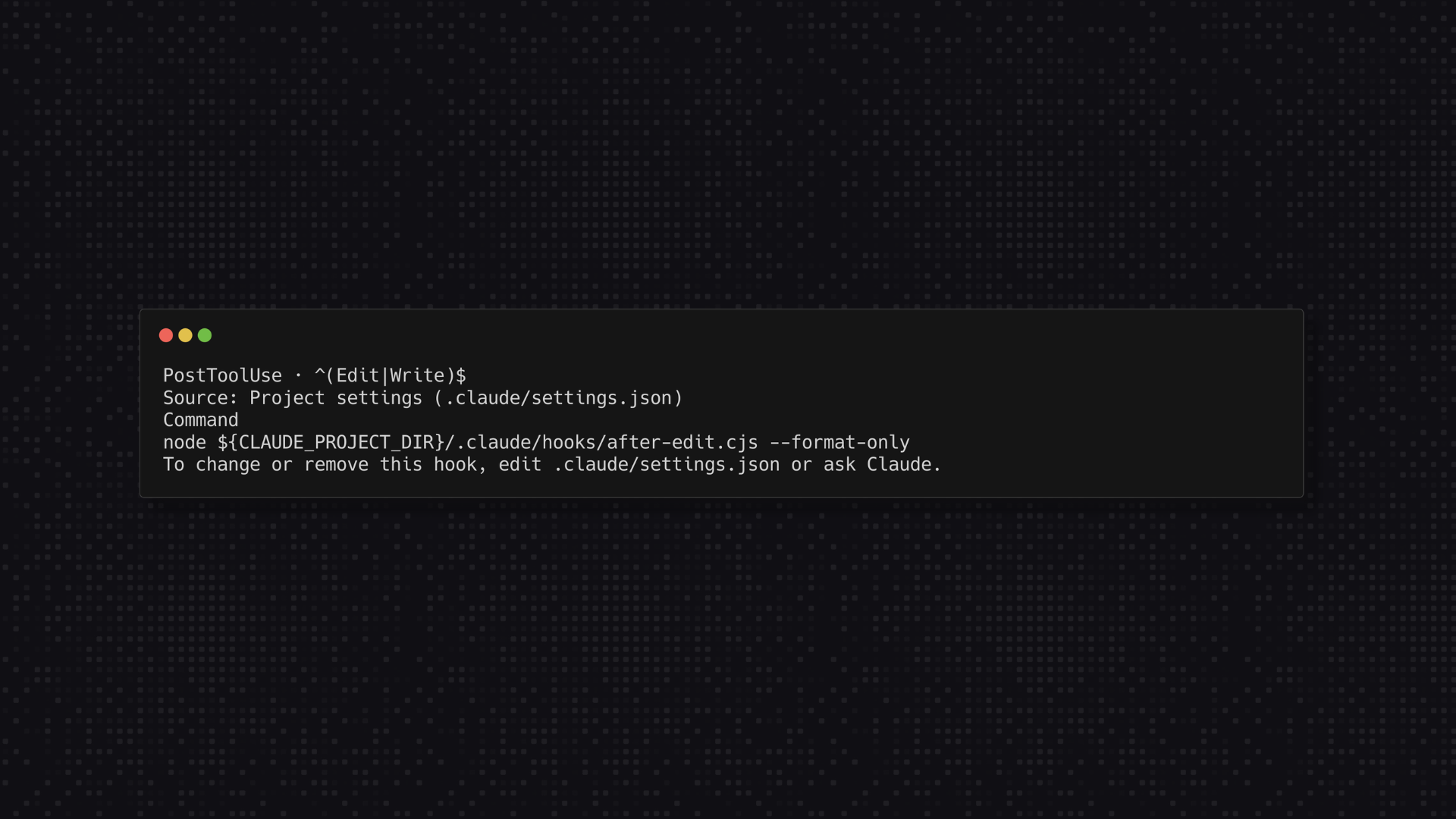
Approve both files only after reviewing them. Then create .claude/settings.json in this practice folder with the following configuration:
{
  "hooks": {
    "PostToolUse": [
      {
        "matcher": "^(Edit|Write)$",
        "hooks": [
          {
            "type": "command",
            "command": "node",
            "args": [
              "${CLAUDE_PROJECT_DIR}/.claude/hooks/after-edit.cjs",
              "--format-only"
            ],
            "timeout": 30
          }
        ]
      }
    ]
  }
}
This is a project settings file. In an existing project, merge the new entry with its current settings; keep other hooks and permissions intact. The settings documentation explains the difference between project, local, user, and managed settings.
The matcher selects only Edit and Write. The script narrows that to the three practice files. The final argument starts it in formatting-only mode. Using separate args invokes the command without a shell and lets Claude Code substitute the project path as one argument, as documented under command hook configuration.
Claude Code reloads most hook-setting changes in the running session. Enter /hooks and check for the project's PostToolUse entry. If it does not appear, use /status to look for a settings error before restarting. The hooks walkthrough shows the same inspection flow.
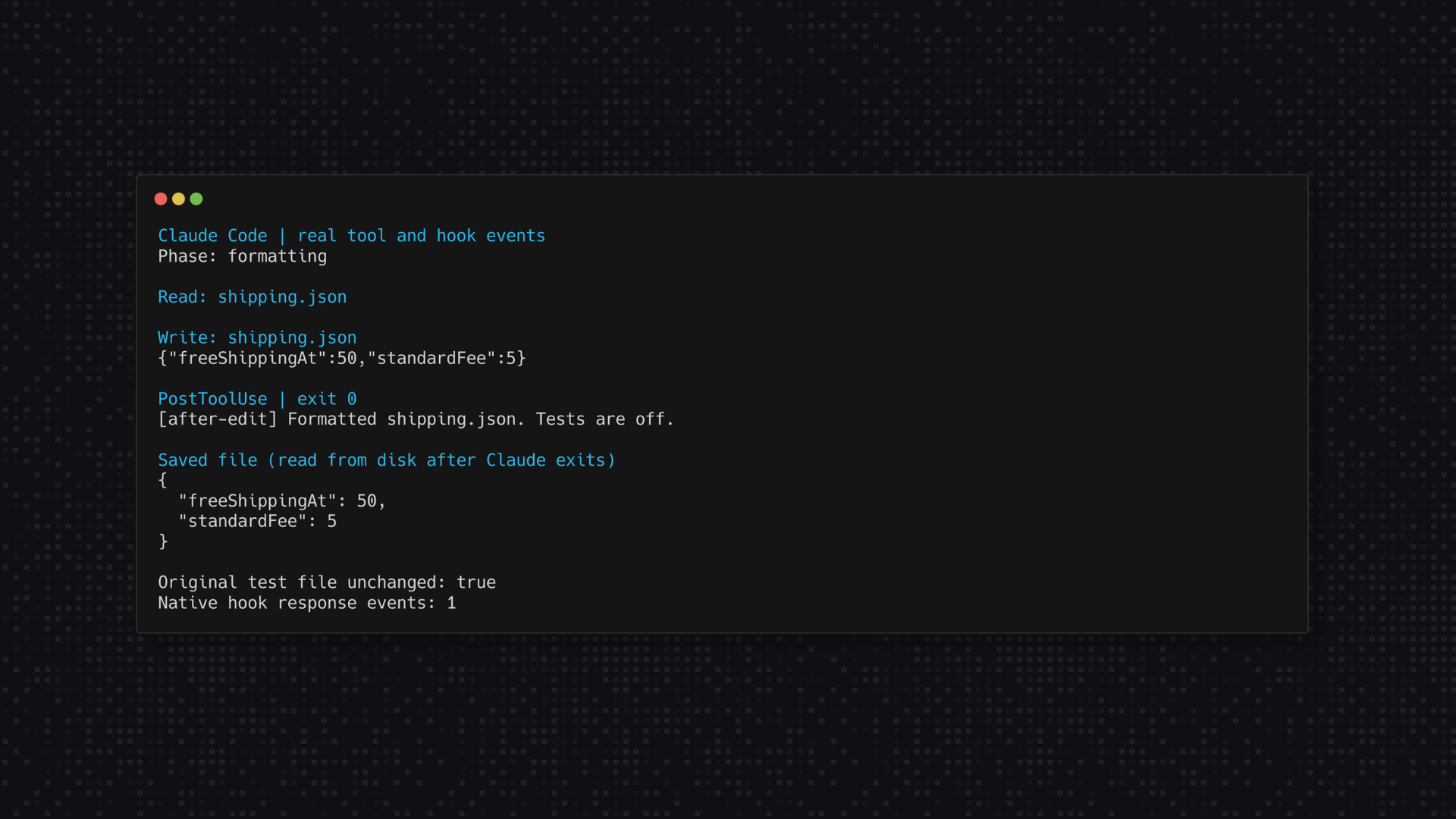
Ask Claude:
Use the Write tool to save shipping.json as exactly this one-line JSON: {"freeShippingAt":50,"standardFee":5} Leave the helper and tests unchanged. Do not run a formatter yourself. Stop after the write so I can check what the hook changed.
Open the saved file yourself. It should use the multi-line, two-space layout shown in Step 1, with both numbers unchanged.
The supplied script returns this successful systemMessage:
[after-edit] Formatted shipping.json. Tests are off.Claude Code shows a systemMessage as a user-facing warning. It is not a test transcript or a pass acknowledgment sent to Claude. Check the saved file as well as the message. This formatter handles the one JSON settings file; it does not format the JavaScript files.
In native QA with Claude Code 2.1.293, a real Write call triggered this format-only PostToolUse hook, saved the same two values with two-space indentation, and left the test-file hash unchanged.
For a larger project, a formatter such as Prettier can handle more languages. Use a reviewed, locally installed version and limit which files it touches. Keep that expansion for after the small example works. Prettier's installation guidance explains how to pin it as a project dependency.
In the hook's argument list, remove only --format-only. Leave the script path and other settings unchanged:
"args": ["${CLAUDE_PROJECT_DIR}/.claude/hooks/after-edit.cjs"]This line is part of the configuration, not a complete settings file. Pro members also have a full format-and-test example in the setup folder.
Check /hooks again. Repeat the one-line JSON request from Step 3. Claude Code should show this user-facing hook message:
[after-edit] PASS: 5 tests passed.Keep formatting and testing in one script. Matching hook handlers run in parallel, so placing separate formatter and test handlers next to each other does not ensure formatting finishes first.
Our script waits for these small tests. For your own app, choose a quick check for each edit and run longer tests at a suitable review point. Avoid launching your entire slow test suite for every small change.
Ask Claude:
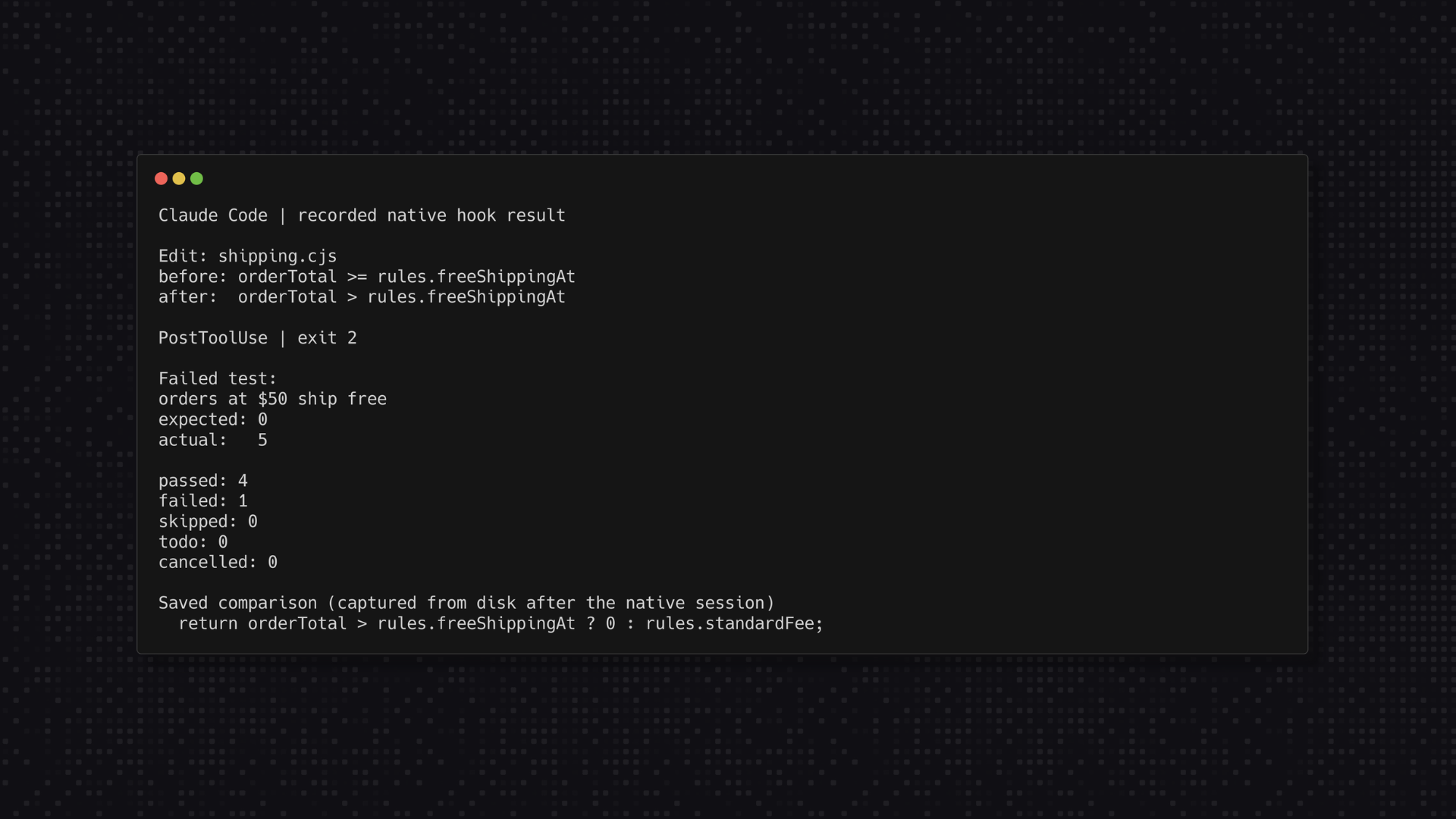
Use the Edit tool to change only the >= comparison to > in shipping.cjs. This deliberately introduces a bug for a local test. Keep the shipping settings and all five tests unchanged. Let the hook run, report its result, and stop before repairing anything. Do not switch tools, disable the hook, or change a test to make it pass.
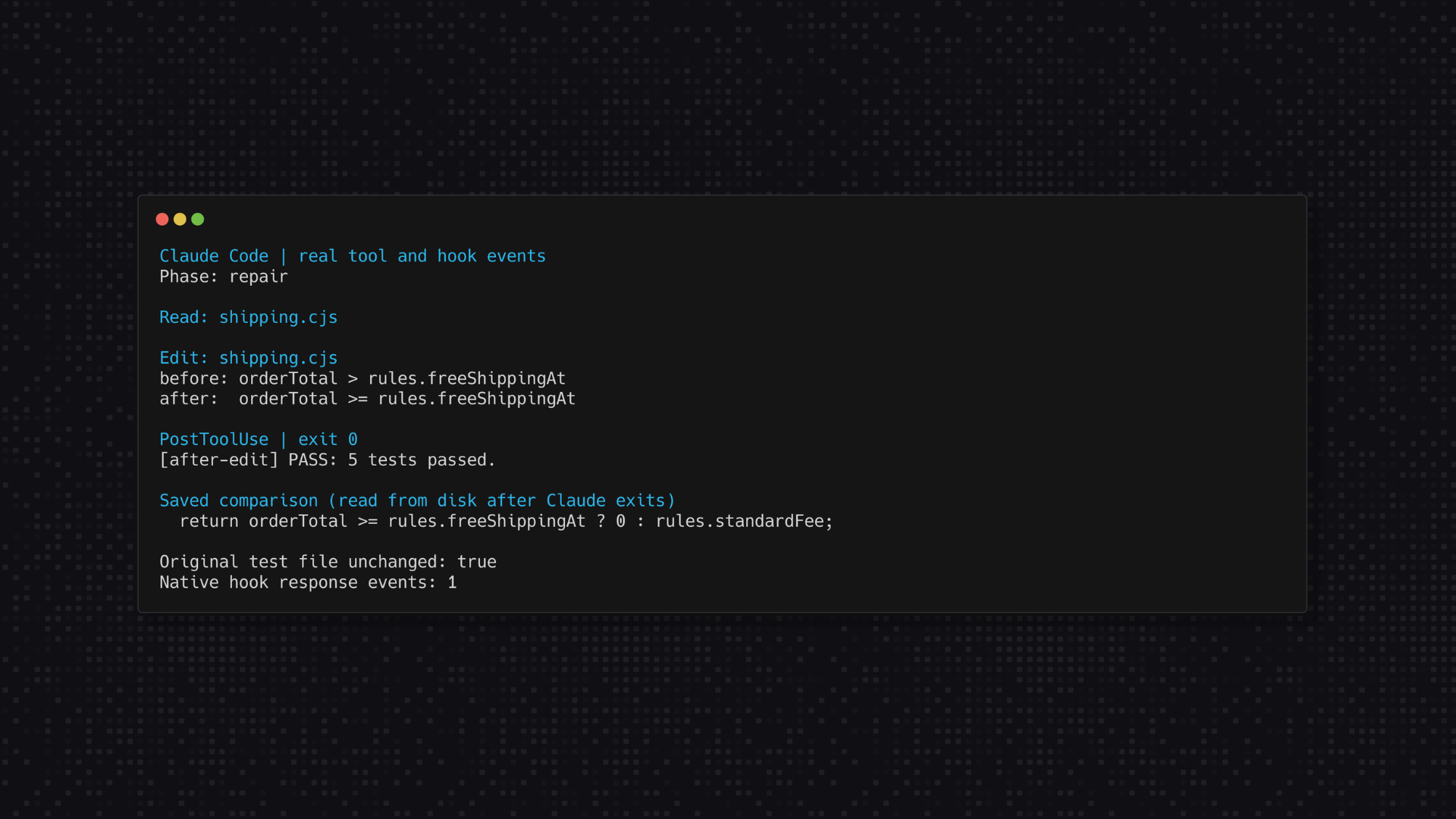
The faulty version still gives the right answer for an order below $50 and an order above it. An order worth exactly $50 now costs $5 to ship. The test for that value should fail.
In our signed-in Claude Code 2.1.293 check, a real Edit call triggered the hook and produced this failure:
[after-edit] Tests failed: 4 passed, 1 failed, 0 skipped, 0 todo, 0 cancelled.
- orders at $50 ship free: Expected values to be strictly equal: 5 !== 0; expected: 0; actual: 5
The tool's edit has already saved. Review the failure before continuing.
The hook returned exit code 2, the faulty comparison stayed saved, and the original test-file hash was unchanged. PostToolUse sends that failure feedback to Claude after the tool result. The screenshots show real Claude Code events captured with termshot, not a recreated chat interface. The failure image arranges fields from the recorded hook result for readability. The interactive presentation can vary by version, so inspect the saved code and hook result too.
The faulty comparison remains saved because a PostToolUse failure cannot undo a tool that already ran. Keep the tests unchanged. Changing the expected shipping fee to $5 would hide the problem.
Send:
Restore the >= comparison in shipping.cjs using the Edit tool. Leave shipping.json and the original tests unchanged. Let the hook run and report the result. Do not commit, deploy, or change other files.
The hook should report five passing tests again. Check that the comparison includes equality, then run the tests independently:
node --test shipping.test.cjsInspect the test file and settings too. They should still contain the original shipping policy and expected results.
Use these checks to review the whole exercise:
| Check | Expected result |
|---|---|
| Save the settings as one line with formatting enabled. | The same values save across several readable lines. |
| Run the correct calculator's tests. | Five pass. |
| Change the comparison so exactly $50 loses free shipping. | The $50 test fails: expected 0, actual 5. |
| Inspect the code after that failure. | The faulty edit is still there. |
| Restore the original comparison without changing the tests. | All five pass again. |
The remediated package passed all 33 local integration checks on macOS 26.6 with Node.js 24.11.1, along with the five shipping tests and the isolated fail-and-repair demo. Those checks cover formatting, the deliberate failure and repair, skipped tests, malformed input, unrelated paths, path aliases, linked files, and other local cases.
Those 33 checks send synthetic hook-event JSON to the actual scripts. Separately, we verified the project entry in /hooks and ran genuine Write and Edit calls with Claude Code 2.1.293 on macOS using Node.js 24.11.1. Formatting worked, the deliberate cutoff bug failed, and restoring >= returned five passing tests without changing the original tests. An independent terminal test run also passed all five checks.
Remove only this command's entry from the project's PostToolUse list. Keep other entries and permission settings. Claude Code should reload the settings change in the running session; check /hooks to confirm the entry is gone. Restart only if the loaded state does not update after you have ruled out a settings error.
Ask for the same one-line JSON write again, without asking Claude to format it. If no other formatter is active, it should remain on one line. You can still run the shipping tests yourself.
We checked this with a fresh Claude Code session: /hooks showed no project hooks, the next Write produced zero hook events, and the saved JSON stayed on one line. An unrelated notes.txt Write was also ignored by the enabled script.
Avoid disabling all hooks to remove one tutorial example. Other hooks may provide checks your team relies on.
Keep going
Pro adds the full on-demand course library, certifications, group office hours, and eligible member perks.
$29/mo, cancel anytime
It handles successful Edit and Write calls on the three files named in the script. Changes from your editor, a shell, another tool, or another project stay outside this example.
The example reports the failure and leaves the file for review. Keep backups and inspect the change before continuing. Use a separate pre-action rule when you need to decide whether an operation may run.
The supplied formatter and tests run locally with Node and make no model or network calls. Claude's work to create, edit, or repair the project still uses your usual Claude Code access.
Yes, as a follow-up to this small exercise. Replace or extend the script with your project's reviewed commands, keep formatting ahead of dependent checks, and test both a pass and a known failure. Use local dependencies rather than a command that might fetch a package during each edit.
Review and adapt it first. It names three files, formats only JSON, and expects at least five tests. It is a teaching example for one local session, not production-safe hardening. It has no cross-session lock and does not manage parallel edits, worktrees, or a release process. Keep your normal code review and release checks.