Keep going
Keep learning with Rundown Pro
Pro adds the full on-demand course library, certifications, group office hours, and eligible member perks.
$29/mo, cancel anytime

Guides Claude Code published oct 5, 2026
Claude Code mods let you add custom behavior to your coding assistant. They can change prompts, add controls, and pause a tool call while you make a decision. Anthropic introduced mods on October 1, 2026.
In this guide, you will build a small mod that asks for approval before Claude edits a file named release-settings.json. You will try an ordinary edit, refuse a settings change, then approve it and check the saved file.
Use a practice folder. This example adds a review step to two file-editing tools. Shell commands, other tools, and other programs fall outside its checks.
University Pro members: Open this guide's Resources panel for the individual starter files, practice files, and tests. Download the setup instructions first, then save each file to the path it lists.
A mod is a plugin whose JavaScript or TypeScript code registers event handlers, called hooks. A hook can respond to a tool call, a submitted prompt, or an interface update. You can load and manage mods through Claude Code's plugin system.
A few useful examples are a panel showing recent file changes, a command that reports task progress, or a review question before a particular edit. The mod authoring workflow lets you ask Claude to write the code from a description.
| You need to… | Start with |
|---|---|
| Save instructions for a repeated task, such as reviewing a pull request. | A Skill. |
| Run a check or script when an event happens. | A settings hook. |
| Ask before editing a fixed file or block a known tool operation. | A permission rule. |
| Add a custom review dialog, interface panel, or event-handling logic. | A mod. |
| Share several of these features as one install. | A plugin. |
Claude Code documents each of these options separately. A simple permission rule may already meet your need. This exercise uses a mod so you can design the review question and preview the proposed change.
Use Claude Code in a terminal for the steps below, with an account that can run it. A terminal is the app where you type commands. You will also need an empty folder and a text editor to inspect the files.
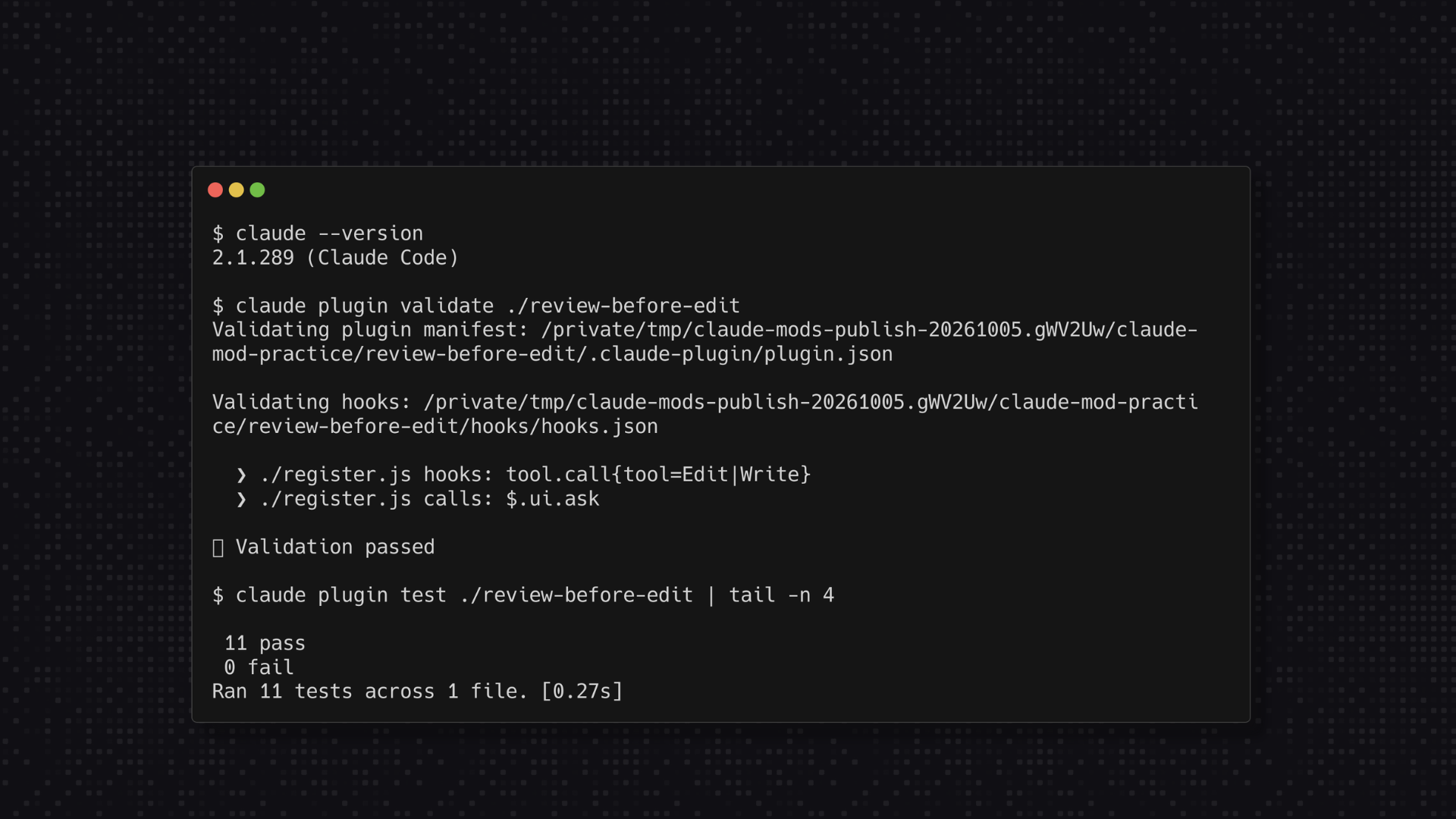
Mods require Claude Code v2.1.287 or later. Use v2.1.289 or newer for this guide because the October 3 release includes permission and mod-loading fixes. In your terminal, check:
claude --versionFor a native installation, update with claude update. For another installation method, follow the matching Claude Code setup instructions.
The terminal and Desktop's Code tab support mod interfaces. Other surfaces have limits, so follow this terminal walkthrough before adapting it to your usual setup.
The supplied starter watches the built-in Edit and Write tools for one filename. It does not inspect Bash, PowerShell, NotebookEdit, MCP tools, or writes from another program. It also does not resolve symbolic links or other names that might point to the same file.
Treat it as a review aid. Keep backups, inspect changes, and use proper file permissions or an isolated environment for work that needs stronger protection. Anthropic's plugin security documentation explains that mods have the same machine access as Claude Code.
For a fixed rule such as asking before editing one path, consider Claude Code's normal Edit permission rules first. Use a custom mod when the review needs more detail or logic.
Keep the reviewed review-before-edit directory. Load it again with --plugin-dir when starting another session. Keep one copy active while testing changes.
Mods that Claude creates in its session's mods folder, ~/.claude/dev-mods/<session-id>/, have a different lifecycle: copy those to a durable folder before relying on them across sessions.
To stop this local example, exit the session and start Claude without --plugin-dir. For an installed plugin, use the plugin manager and open /plugin → Installed to disable or uninstall it.
For troubleshooting, claude --safe-mode starts a session without user-installed mods and other customizations. That also removes this review check. Use it in the practice folder and restore your normal setup afterward.
A file-review check solves one small problem. The next step is a clear process for planning a build, testing changes, and deciding when an app is ready for users.
Nate Grahek's Intro to Vibe Coding covers project scope, AI coding tools, debugging, deployment, and production risks such as authentication, payments, and API keys.
Watch Intro to Vibe Coding with University Pro →
The starter files and tests are available through this guide's Resources panel for University Pro members. Claude access and usage have separate terms. The course teaches broader development methods; this guide covers the new mods feature.
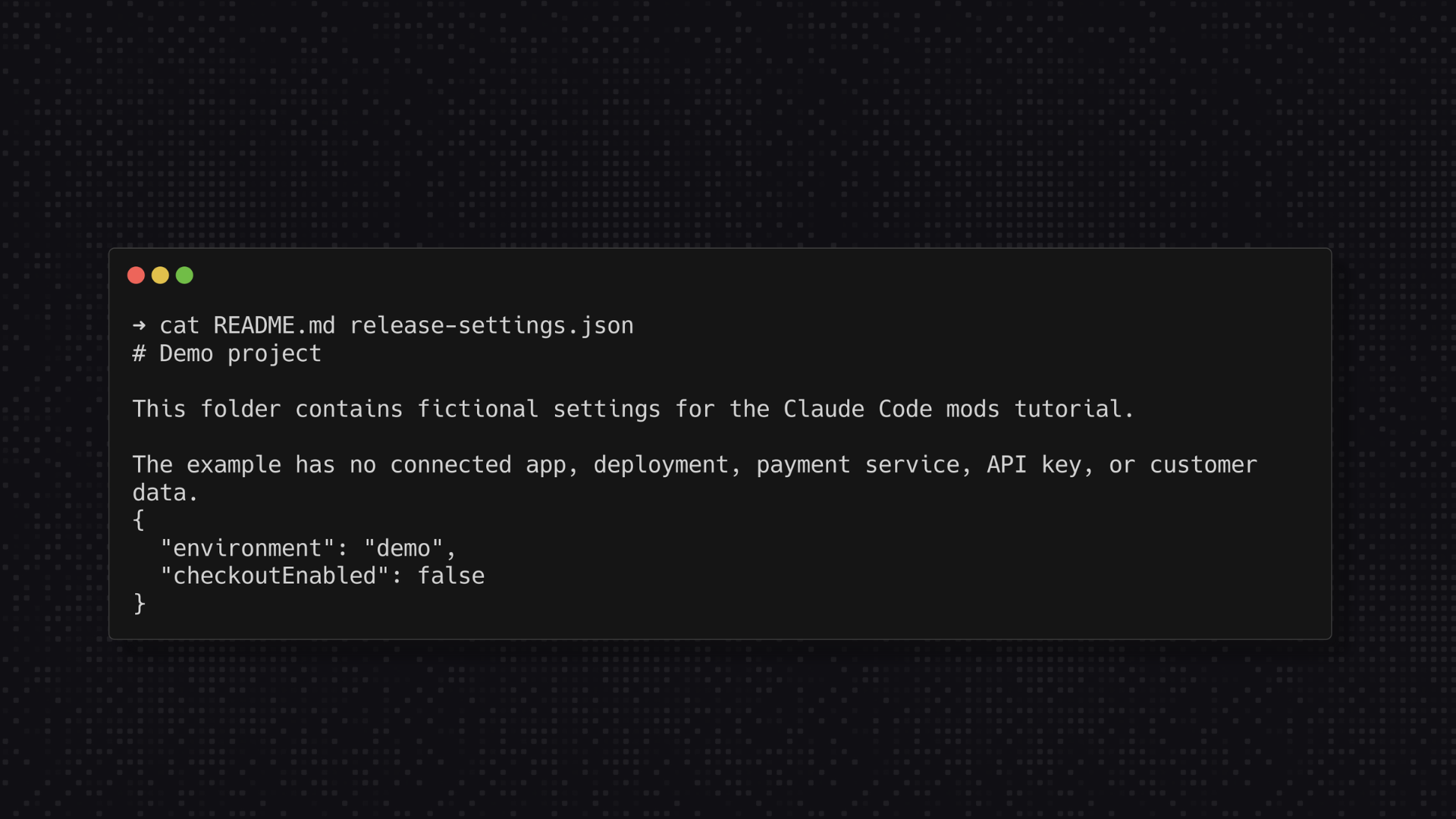
Create a new folder called claude-mod-practice. Open it in your editor and create two files.
README.md
# Demo project

This folder contains fictional settings for a Claude Code tutorial.
release-settings.json
{
  "environment": "demo",
  "checkoutEnabled": false
}
The setting has no connection to a real checkout or website. It gives you one value to check before and after an edit.
Open a terminal in this folder and run:
claudeReview the workspace trust prompt. Keep Claude Code's normal permission checks enabled and leave unrelated files and connected services out of this exercise.
At the Claude Code prompt, enter:
/plugin-authoringThis loads Anthropic's built-in plugin-authoring guidance. Then paste the request below. It asks for source files and tests before the mod runs.
Build a Claude Code mod named review-before-edit for this practice folder.
Use the plugin-authoring guidance and the API supported by my version.

Save the plugin in ./review-before-edit. Create source files and tests
only. Do not install it, enable hot reload, change permissions, or load it.
Do not edit README.md or release-settings.json while building the mod.

Behavior:
- Handle tool.call for the built-in Edit and Write tools.
- Check the final filename in file_path. Match release-settings.json
  case-insensitively, including paths with Windows separators.
- Leave other filenames to the usual tool and permission checks.
- For a matching file, show the tool name, path, and a short preview of
  the proposed edit. Label any truncated preview clearly.
- Ask through $.ui.ask with these choices, in this order:
  "Keep file unchanged" and "Allow this edit".
- Continue with next(e) only for the exact answer "Allow this edit".
  Preserve the original tool input and all normal permission checks.
- Refuse if the question is dismissed, cannot be shown, or returns any
  other answer. Tell Claude to stop rather than try another tool or path.
- Add a .catch handler that returns a denial if this handler fails.
- Ask again for every matching edit. Never save blanket approval.

Keep the mod small. Use no network calls, subprocesses, extra model
calls, direct filesystem access, or new dependencies.

Add tests for allowed and refused edits, Write replacement, other files,
repeated requests, and a downstream permission denial. Explain how to
run them with claude plugin test. Show all files and the exact load
command. List the tools and paths this example does not cover.
Read the source before loading it. Ask Claude to explain any code you do not understand. Have an experienced developer review it when necessary.
Expect the mod file structure to include a plugin description, a file pointing to the code, and the code itself. Tests may occupy a separate folder.
review-before-edit/
  .claude-plugin/
    plugin.json
  hooks/
    hooks.json
    register.js
  tests/
    review-before-edit.test.ts
Claude may choose register.ts; the file named in hooks.json must match. University Pro members can use the starter files in this guide's Resources panel instead of generating another version.
Mods run with broad access to your machine. They can reach files, start processes, or make network requests through the mods API. Review what you install, even when Claude wrote it for you, and follow any organization controls for mods. Anthropic's plugin security guidance recommends treating installed plugins as trusted code.
In a second terminal, with claude-mod-practice as the working folder, run these commands separately:
claude plugin validate ./review-before-editclaude plugin test ./review-before-editThe validator checks the package and lists hooks: and calls: without running the mod. Review its capability inventory and all warnings. A passing validation cannot prove that the code is safe. See the plugin validate command reference for details.
The mod test runner exercises the mod with simulated events. It needs no model session, sign-in, or network. Confirm that tests actually ran and passed. Ask for a fix when a test fails or the runner finds none.
For this example, the source should handle tool.call and ask a review question through ui.ask. Unexpected file access, network calls, process launches, or permission overrides need an explanation before you continue.
Close your first Claude Code session. From the same practice folder, start a new one with:
claude --plugin-dir ./review-before-editThis loads the local plugin for one session. It gives you a way to try the code before arranging a permanent installation.
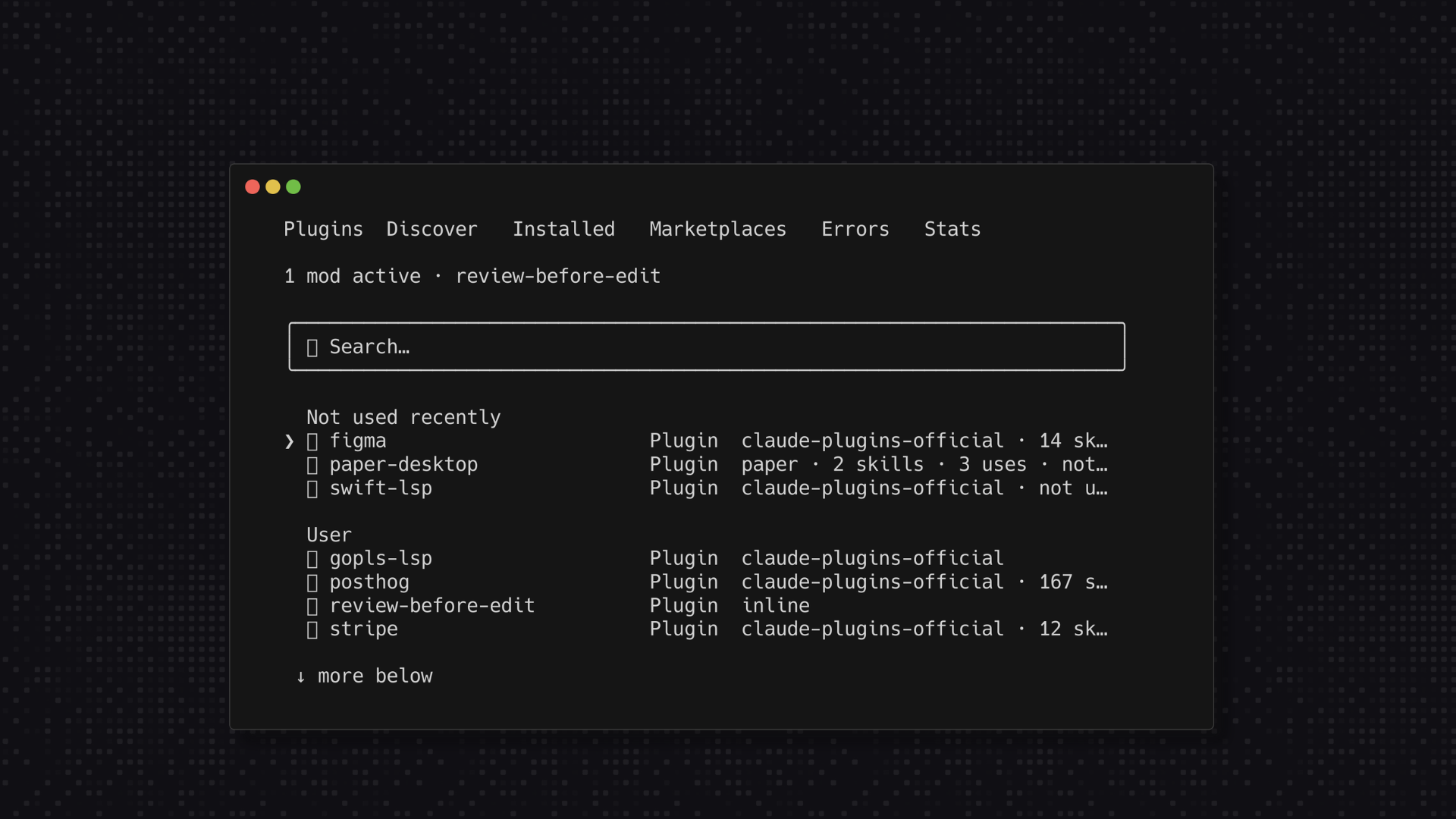
Inside Claude Code, run /plugin and check the Installed tab for review-before-edit. Stop here if the mod has not loaded. Claude Code's mods overview explains how to check loaded mods.
First, ask:
Use the Edit tool to add this sentence to README.md:
"This project is for practice only."
Leave release-settings.json unchanged.
The mod should add no custom question for this file. Claude Code may still show its normal permission prompt. Check the saved README in your editor.
Next, ask:
Use the Edit tool to change checkoutEnabled from false to true in
release-settings.json. Keep environment set to demo. Stop if I decline.
Do not use a shell, another tool, or a different path to make the change.
Look for the custom question with the filename and proposed change. Choose Keep file unchanged.
Open release-settings.json in your editor. checkoutEnabled should still be false. Claude's statement that it stopped is only one part of the check. The saved file provides the evidence.
If the file changed, stop the exercise. Disable the mod and investigate the tool call and loaded code before continuing.
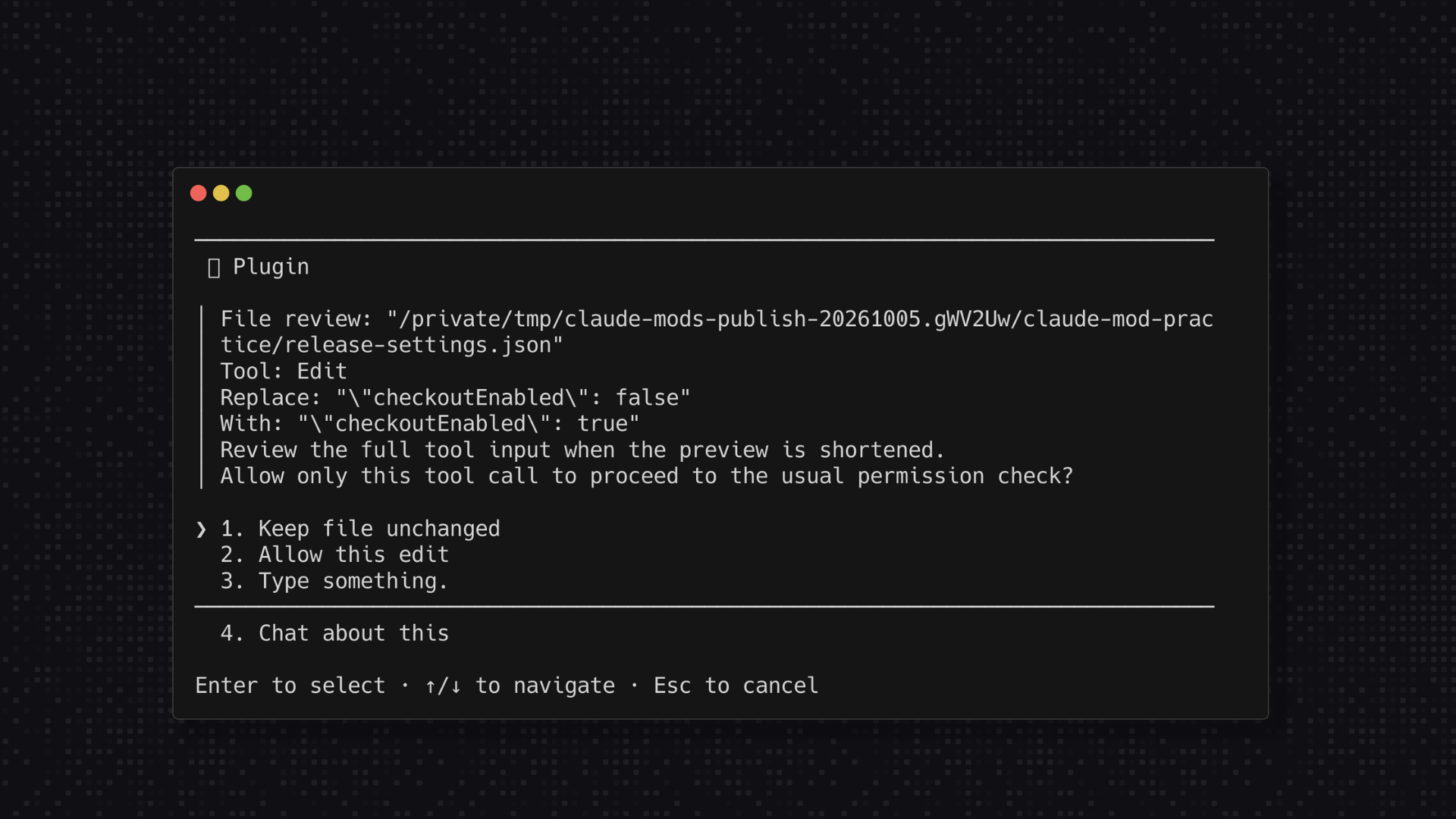
Repeat the same settings-change request. This time, choose Allow this edit.
A normal Claude Code permission prompt may follow. The mod's approval lets this tool call continue through the existing checks. It does not remove them.
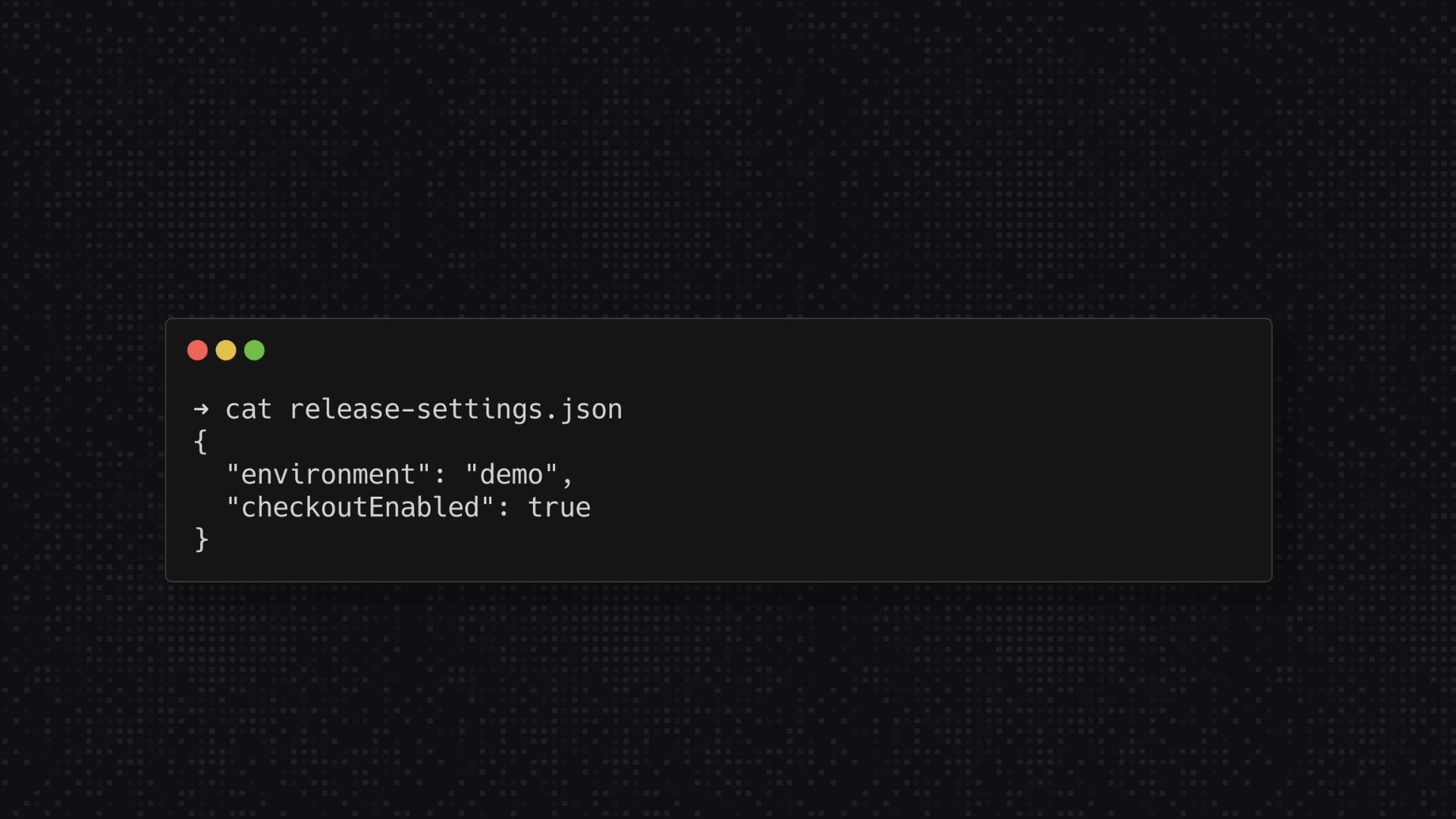
When the edit finishes, open the file again. It should contain:
{
  "environment": "demo",
  "checkoutEnabled": true
}
Ask Claude to change the value back to false. The custom question should appear again. One approval should cover one tool call.
Use this checklist before keeping the mod:
| Test | Expected result |
|---|---|
Edit README.md. | No custom mod question. Normal permissions still apply. |
| Edit the settings file and choose Keep file unchanged. | The original value remains. |
| Repeat and choose Allow this edit. | The call proceeds through normal checks; inspect the resulting file. |
| Request another settings change. | A fresh review question appears. |
| Dismiss the review question. | The requested edit does not proceed. |
| Ask Claude to use Write to replace the settings file. | The same review step appears for the replacement. |
These are expected results for the example. Run them against your installed version and inspect the files yourself.
Keep going
Pro adds the full on-demand course library, certifications, group office hours, and eligible member perks.
$29/mo, cancel anytime
You can describe the mod and have Claude write it. Claude Code loads JavaScript and TypeScript modules directly. Review the code and tests before allowing it to run.
Yes, in the Code tab for supported local sessions. Desktop sessions running in WSL do not load plugins. The VS Code extension's chat panel can run mod handlers but does not show custom mod panels. Use the terminal for this walkthrough and check the current mod platform support before adapting it.
Check that it loaded, that the tool call uses Edit or Write, and that the filename matches. Admin settings, safe mode, or a load error can also prevent it from running. Inspect the actual tool call before changing the rule, then follow the mod troubleshooting steps.
Tests check the cases they contain. Add a live check in a practice folder, review the code's access, and retest after changes. Keep ordinary permissions enabled.