Community

Share your best AI workflow. We could show it to 2M+ people.

Every day, we feature the community's top-voted AI workflow in The Rundown newsletter. One post will put you on the radar of top founders, hiring managers, and operators across the industry.

Welcome!

An AI-powered master plan for acreage landscaping, covering design, phased builds, irrigation, maintenance, budgets, and long-term care

Start with the property, not a generic landscaping template. Upload photos, measurements, site constraints, current problems, future plans, budget limits, and the look you want. Then use AI to build a complete picture of how the property functions today and how it should evolve over time. Next, work area by area. For overcrowded garden beds, map every tree and shrub, then assess mature size, spacing, health, irrigation coverage, sightlines, and maintenance demands. From there, use AI to determine what should stay, what should move, what should be removed, and how each bed should be reshaped and edged. Convert each recommendation into an execution plan that includes: Step-by-step: 1. The target design 2. A step-by-step build sequence 3. Required materials and tools 4. Budget and priority level 5. Seasonal timing 6. A year-by-year maintenance plan Finally, connect every individual project into one master roadmap. Plan the garden beds, trees, lawn, irrigation, drainage, driveway, shelterbelts, recreation areas, and future buildings together so one improvement does not create a problem somewhere else. The result is a living property operating system. Add a new photo, issue, or idea, and the plan updates with the next best action.

Tools used
Industry

Build an n8n AI Newsletter Digest in Gmail

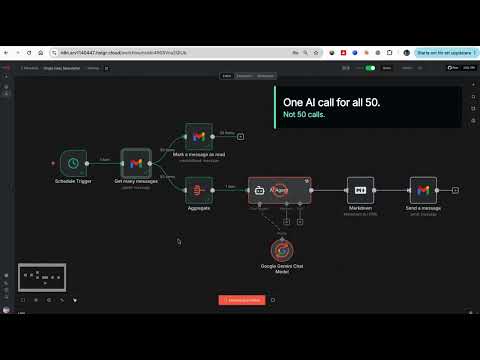
One email instead of 50: an n8n workflow that reads all my AI newsletters and sends me a single daily digest in under 2 minutes THE PROBLEM: I subscribe to dozens of AI newsletters. The Rundown, Superhuman, TLDR, The Neuron, AlphaSignal, TheSequence, Turing Post and many more. Reading them took hours every day, and most of them cover the same three stories. I wanted the coverage without the reading time. So I moved every subscription to a dedicated Gmail address and let n8n read that inbox for me. It has run daily since February 2026 and I now read one email a day instead of 50. STACK: n8n (hosted on Hostinger), Gmail, Google Gemini 2.5 Pro. HOW TO BUILD IT: STEP 1: Create a dedicated Gmail account and move every newsletter subscription to it. This one decision makes everything else simple. Your personal inbox stays clean and the workflow never touches mail that is not a newsletter. STEP 2: Schedule Trigger node, daily at 08:00. Set the workflow timezone (mine is Europe/Stockholm) or the trigger runs on server time. STEP 3: Gmail Get Many Messages node on the newsletter account. Filter by read status: unread. Return All: on. Simplify: OFF. That last toggle matters, see gotcha 2. STEP 4: Connect two branches off that node. Branch one is a Gmail Mark As Read node with message ID {{ $json.id }}. Unread is the whole state system: each run only fetches what arrived since the last run. No database, no date filters, no dedupe logic. STEP 5: Branch two is an Aggregate node. Aggregate the "html" field of every email into one array field called CombinedNewsletter. This means one AI call per day instead of one call per email. STEP 6: AI Agent node with a Google Gemini Chat Model attached (models/gemini-2.5-pro). Turn on Retry On Fail with 5000 ms between tries. The prompt: Below is all the news in html format. Only use what is provided; if the HTML looks cut off, still summarize everything you can see. {{ $json["CombinedNewsletter"].join('\n\n').substring(0, 250000) }} The substring cap is load bearing, see gotcha 1. System message (verbatim, numbering written as (1) so this form does not strip it): "You will receive ALL the AI newsletters from the past day in HTML format. Your task: (1) Extract every distinct news item (no duplicates, even if repeated in multiple newsletters). (2) For each item, find: a short, human-readable title, the best URL, a one-sentence summary (max 25 words). (3) Estimate popularity based on how many newsletters mention it. If an item appears only once, rank by how interesting the general public might find it. Output format (Markdown only): # Daily AI News Digest, then '## Top headlines' listing the 5 most popular/important items as 'Title Summary sentence', then '## More news' listing all remaining items in the same format. Rules: Always use Markdown links like Title, never show bare URLs. Do not skip any news item. Do not add any commentary, explanations, or closing text beyond the structure above." STEP 7: Markdown node, mode Markdown to HTML, destination key combinedHTML. STEP 8: Gmail Send node to your personal address. Subject: Here's ALL the AI News! {{now.toFormat('yyyy-MM-dd')}}. Wrap {{ json.combinedHTML}} in a full HTML document with inline CSS: white card, max-width 720px, system fonts, styled links. See gotcha 4. FOUR THINGS THAT COST ME HOURS: (1) Raw newsletter HTML broke Gemini. The workflow refused to execute with a payload limit error. Newsletter HTML is enormous: tracking pixels, nested tables, inline styles. Fifty of them concatenated is millions of characters. The .substring(0, 250000) cap in the prompt fixed it, and the "if the HTML looks cut off, still summarize" line tells the model how to handle the truncation. (2) Gmail's Simplify toggle is on by default and strips the message body. Gemini kept receiving empty or gutted content and no error explained why. Turn Simplify off to get the full html field. (3) Gemini rate limits AND timeouts both hit on big runs. Retry On Fail with a 5 second wait fixed both. Without it, one 429 kills the whole morning digest. (4) Sending the model's raw markdown as email looked broken in Gmail. Two part fix: a Markdown to HTML node, then a proper HTML template with CSS in the send node. RESULT: the latest real run turned 50 unread newsletter emails into one clean digest in less than 2 minutes (1 minute 27 seconds to be exact). Running every morning since February 2026. Honest failure mode: mark as read runs as a parallel branch, so if Gemini fails after all retries, that day's emails are already marked read and drop out of tomorrow's digest. I accepted that trade off. The alternative is duplicate items on every retry, and one missed day costs less than a digest full of repeats. Rebuild time: about 30 to 45 minutes if the dedicated inbox already exists.

Tools used
Industry
#dailydigest#emailautomation#informationoverload#newsletter#summarization
6

Repurpose One Video Transcript Into Four Posts With n8n

Content Repurposing System: one transcript into 4 platform-ready posts in 18 seconds. THE PROBLEM Every video cost me two hours turning it into posts for Twitter/X, LinkedIn, Skool and Instagram. The writing wasn't hard. The context switching was. Four platforms, four tones, the same idea rewritten four times. Built during the Skool x Hostinger n8n hackathon, Dec 2025. Still my daily workflow. STACK: n8n on a Hostinger VPS, OpenAI, Google Sheets. 13 nodes. HOW TO BUILD IT Manual Trigger. Swap for a Form or Drive trigger if you want it hands-off. Set node "Set Transcript", one string field: transcript. Leave a real sample transcript in the default value so anyone can hit execute and see output immediately. IF node "Check Transcript", two conditions with AND: transcript is not empty, and {{ $json.transcript.length }} > 50. False branch goes to a Stop and Error node. Four minutes of work. It's why I've never burned 5 API calls on a blank field. OpenAI node "Analyze Content", model gpt-5.4-mini, Simplify Output OFF: You are a content analyst. Analyze this video transcript and extract: Main topic/theme 3-5 key insights or takeaways Target audience Tone (educational, motivational, technical, etc.) Any specific examples, statistics, or stories mentioned Transcript: {{ $json.transcript }} Provide your analysis in a structured format. I don't send the transcript to four writers. I send it to one analyst first, and all four writers read that analysis. This lifted quality more than any prompt tweak: the posts share one reading of the material instead of each model guessing. The stronger model goes here for the same reason. Wrong analysis, four wrong posts. 5-8. Four generators, all gpt-4o-mini, Simplify Output OFF, all wired from Analyze Content's single output. Each pulls the same two inputs: Content Analysis: {{ $('Analyze Content').item.json.choices[0].message.content }} Original Transcript: {{ $('Set Transcript').item.json.transcript }} Then its own rules. Twitter (temp 0.8): hard hook, under 280 chars, one insight, no hashtags. LinkedIn (0.7): 150-250 words, 2-3 line paragraphs, ends on a question, no hashtags. Skool (0.8): 100-200 words, always a numbered list of actionable takeaways, ends by inviting replies. Instagram (0.8): 125-175 words, 5-8 hashtags, plus a detailed "Visual suggestion:" for a designer or image model. LinkedIn needed a tone block after v1 read like a press release: talk like you're with a colleague over coffee, use I and you, never "leverage", "in today's landscape", "fast-paced". Naming banned words works. "Write conversationally" does nothing. Merge node "Collect All Posts", 4 inputs, one generator per index. Aggregate node, mode All Item Data. Puts all four posts on one row instead of four. Code node "Format Output". Reads each generator by node name, each in its own try/catch, so one failure still writes a row. Builds a readable timestamp, a 100-character transcript_preview, and status: 'Generated'. Google Sheets, Append Row, Map Automatically. THE SHEET Seven columns, headers in row 1, named to match the Code node exactly: timestamp, transcript_preview, twitter_post, linkedin_post, skool_post, instagram_post, status. Status is a dropdown: Generated > Reviewed > Scheduled > Published. The system drafts, I decide. FOUR THINGS THAT COST ME HOURS Turn Simplify Output OFF on every OpenAI node. Every expression reads choices[0].message.content, which only exists in the raw response. Leave Simplify on and you get four empty columns with no error explaining why. No title row above your headers. I had a merged title in row 1, headers in row 2. Map Automatically stopped seeing my columns and silently built duplicates beside them. Extend data validation down the whole column (G2:G1000, not G2). I set the dropdown on one cell and every appended row arrived as plain text. Kill markdown in the prompt, not after. I wasted an evening regex-stripping ** in the Code node. The fix was upstream: tell Skool and Instagram plain text only, CAPITALS or "quotes" for emphasis. Zero artefacts since. Post-processing cleanup means your prompt is underspecified. RESULT Two hours per piece became 18 seconds of runtime plus 5-10 minutes of review. I tested 20 transcripts across five content types (tutorial, interview, news, explainer, motivational). Most were publishable with light edits. The failure mode never changed: rambling transcript, vague analysis, four vague posts. Which is exactly why the analyst node gets the better model. Budget 30 minutes to rebuild. The prompts are the product. Copy the structure, then rewrite the platform rules in your own voice. That's what decides whether it sounds like you or like everyone else.

Tools used
Industries
#contentrepurposing#googlesheets#promptengineering#socialmedia#transcript

Build a Free, Case-Based AI Textbook with Claude and GitHub Pages

I teach AI in Business at Western Washington University, and I built a free, case-based AI textbook with Claude and GitHub Pages: https://prof-califf.github.io/ai-in-business/ The 11-chapter digital textbook includes seven real company cases—EveryCure, Netflix, Spotify, Uber, Waymo, Airbnb, and Epic—plus chapters on AI’s environmental cost, ethics, regulation, and the future of work. Seven chapters include hands-on Python labs, and Chapter 8 has an interactive calculator that models the energy and water footprint of a reader’s own AI usage. The textbook is free, has no publisher, and costs $0 to host. The problem was that AI textbooks are stale before they ship. An 18-month publishing cycle means students can pay $200 for a book that is already two model generations behind. Textbooks also tend to teach theory first and postpone business relevance until much later. My students do not need to derive backpropagation. They need to understand why Spotify built a recommender, how it works, what broke, and what it cost—then build one themselves. My stack is Claude, GitHub Pages, VS Code, Google Colab for the labs, and n8n for the Chapter 7 agentic lab. The project started when I was assembling a reading list and could not find anything usable—only outdated textbooks and paywalled cases. I already had years of lecture notes scattered across documents. Step-by-step: 1. I locked in a framework first. I use the AI Factory model—Data → Model → Prediction → Decision → Value → loop—and run every company through it. This is the step people skip: it builds transferable skills for students and gives Claude a stable structural contract across every chapter. 2. I set up the repository before writing. I created a new repo, added `index.html`, opened Settings → Pages, and confirmed that the site deployed. Five minutes up front was better than debugging after 40,000 words. 3. I built one chapter completely and used it as the template. Each chapter is a single, self-contained HTML file with no build step or dependencies. Then I prompted Claude: "Here's my finished Chapter 1 as the format reference. Here are my notes on Uber. Draft Chapter 4 in the same structure and voice." A finished exemplar worked better than an abstract description. 4. I started from my existing material instead of using a blank prompt. Claude structured and clarified my notes, but it did not decide what I think. I rewrote anything that did not sound like me. That distinction preserved the resource’s voice and avoided generated filler. 5. I made the labs builds rather than exercises. Students reconstruct each system in Google Colab using Claude as a coding partner, then publish their work to their own GitHub repositories. They finish with artifacts. 6. I shipped an incomplete version and update it like software. I published with fewer chapters, then edit and push updates when regulation changes so students automatically get the current version.

Tools used
Industry
#claude#curriculumdesign#digitaltextbook#education#githubpages
2

Build a Pet-Sitting Booking App with Google AI Studio and Claude

A friend who had just started a pet-sitting and dog-walking business asked me to build a booking app. I used Google AI Studio to design the initial prototype. The process was straightforward, and I had a basic working system running within two hours. AI Studio created a Firebase database to store the details and was also effective at designing frontend changes. It published the app for me, and the resulting UI was intuitive. After demonstrating the app, I identified many additional features that needed to be added. This went beyond AI Studio’s capabilities, so I exported the code from AI Studio and started using Claude. I asked Claude to analyze the code and suggest the required changes. Claude identified critical security flaws in the database. I fixed them manually at first, but then realized that Claude could access the Firebase database and fix issues automatically. I continued prompting Claude with additional feature requests, and it built them. There were errors along the way, so I needed to be familiar with Google Chrome’s developer tools to copy the errors and ask Claude how to fix them. I used MailJS for email templates and Resend for email transport. I stored the app in GitHub and allowed Claude to access the repository so it could commit changes automatically. I ran the app locally with npm during development and then hosted it on Vercel. Eventually, I purchased an inexpensive domain name, and the app is currently hosted at Names. One major problem was that when Google AI Studio created the Firebase database, the permissions were locked, preventing me from making administrative changes. I solved this by recreating the database and asking Claude to write the SQL query to set it up. The permissions were still tricky, and I had to continue asking Claude to correct them. Google’s service permissions can be difficult to understand, and finding the correct settings was not always easy. Firebase was also complex to navigate, and getting the permissions configured correctly took time. Once I allowed Claude to connect to the app and its background services through the Google plugin, development became much faster. However, you need to trust the tool carefully and always work on a copy of the live app. Overall, I think app development with Google AI Studio and Claude is impressive. You can create professional apps quickly. I come from an IT support background, though, and I think people who are new to IT may find it difficult to troubleshoot errors without a basic understanding of networking and systems administration. I also built a litter-tracking app using ChatGPT, and it was equally effective. I eventually started using Codex and Claude Code, but I think standard Claude and ChatGPT are more intuitive for nontechnical users. Step-by-step: 1. I used Google AI Studio to create an initial booking-app prototype for a pet-sitting and dog-walking business. 2. I used the Firebase database created by AI Studio to store the app’s details and used AI Studio to design frontend changes. 3. I published the initial app with AI Studio and demonstrated it to identify additional features. 4. I exported the code from AI Studio and asked Claude to analyze it and suggest changes. 5. I addressed the critical database security flaws identified by Claude, first manually and later by allowing Claude to access the Firebase database. 6. I prompted Claude to build additional features and used Google Chrome’s developer tools to copy errors and ask Claude for fixes. 7. I recreated the Firebase database when AI Studio’s locked permissions prevented administrative changes, then asked Claude to write the SQL query to set it up. 8. I used MailJS for email templates and Resend for email transport. 9. I stored the app in GitHub and allowed Claude to commit changes automatically. 10. I ran the app locally with npm during development, hosted it on Vercel, and later purchased an inexpensive domain name that is currently hosted at Names. 11. I connected Claude to the app and background services through the Google plugin, while continuing to work on a copy of the live app.

Tools used
Industries
5

Build an Autonomous AI SDR Engine in n8n with CRM Memory

I built an autonomous, end-to-end AI Sales Development Representative (SDR) engine entirely in n8n. On a scheduled trigger, the agent calculates targeting parameters, reads long-term CRM memory to avoid duplicate outreach, searches for and qualifies prospective leads, scrapes company websites for buying signals, drafts tailored outreach emails, writes structured relational data to PostgreSQL, and reports execution summaries through Telegram—with zero manual intervention. The system is currently deployed in production for a B2B agricultural export business, generating qualified international wholesale leads on a recurring schedule. Most AI automations rely on simple linear scripts or break down when handling complex agentic tool workflows. This system addresses three common failure points: - High API costs: Re-sending large system prompts and tool schemas on every agent iteration drains tokens. - Context blindness: Agents without memory of previous contacts can send duplicate outreach. - Database crashes: Agents may hallucinate ENUM values or fail to insert nested one-to-many arrays into relational tables. The workflow uses a Cloudflare-proxied Claude Sonnet 4.6 model with prompt caching, persistent CRM memory reads, and a fault-tolerant parallel database-write architecture. The stack includes n8n as the orchestrator; Claude Sonnet 4.6 through a Cloudflare Worker proxy as the LLM core with ephemeral prompt caching; PostgreSQL for CRM contacts, intelligence, and outreach tables with custom ENUMs; SerpAPI for prospect discovery; Firecrawl for website content extraction; and Telegram for execution reporting. The workflow exposes these tools to the n8n agent: - `read_relationship_memory`: Read-only SQL access to historical contact and outreach data, preventing duplicate prospecting. - `Lead_Finder`: Searches for and identifies target prospects by country and sector. - `Scrape_Website_Content`: Extracts website content, buyer-intent signals, and objections from discovered domains. - `write_relationship_memory`: Writes leads, intelligence facts, and drafted emails to Postgres in one resilient call. Step-by-step: 1. A Schedule Trigger feeds a JavaScript “Country Calculator” node that resolves the day’s targeting parameters—region and industry focus—using ISO week rotation. This cycles outreach across markets automatically. 2. The AI Agent connects to an OpenAI Chat Model node whose Base URL points to a custom Cloudflare Worker. The worker translates OpenAI-formatted requests into Anthropic’s Messages API, enabling Claude Sonnet 4.6 while injecting ephemeral cache-control headers into the system prompt and tool definitions to reduce repeat-token costs. 3. Before researching, the agent calls `read_relationship_memory` to check relationship status and outreach history, preventing duplicate contact attempts. 4. `Lead_Finder` searches target sectors in the day’s region and returns seven filtered candidates. `Scrape_Website_Content` then visits each domain, extracts clean page text, and surfaces offerings, value propositions, and likely objections. 5. The workflow writes nested one-to-many data—multiple facts and one outreach log per contact—without item duplication or ENUM crashes. The tool schema requires a strict JSON array with exact ENUM string choices spelled out in the description. 6. A sub-workflow triggered by “When Executed by Another Workflow” splits the array, then flattens nested `contact.*` fields to root keys using JavaScript. 7. An upsert query, `ON CONFLICT (email) DO UPDATE`, writes the contact, increments `email_count` for repeats, and returns `contact_id`. 8. A “Re-attach Context” node merges `contact_id` back with the original intelligence array and outreach payload because n8n strips extra data through single-row database nodes. 9. Two parallel branches run: one inserts the outreach log with `ON CONFLICT DO NOTHING`, while the other splits and inserts each intelligence fact with defensive ENUM sanitization. This eliminates crashes and duplicate rows during retries. 10. The agent’s final output triggers a Telegram message summarizing the discovered leads, extracted facts, and drafted emails, sent directly to the operator’s phone. The result is a production-grade, self-healing AI outbound pipeline running with zero manual intervention. It maintains CRM data integrity, avoids duplicate outreach, and uses prompt caching to keep LLM costs low at scale.

Tools used
Industries
#admirer#firecrawl#postgres
4

Créer un SaaS d’automatisation avec un dashboard IA de service client

Je veux créer N’ose Digital IA, un SaaS international dédié à l’automatisation et conçu de A à Z comme un véritable business SaaS, avec l’IA au cœur de la plateforme. Le projet comprend un dashboard IA de service client ainsi qu’un agent vocal qui répond aux clients et s’appelle « Client ». Step-by-step: 1. Créer le SaaS N’ose Digital IA. 2. Optimiser la plateforme autour de l’automatisation. 3. Concevoir un dashboard IA dédié au service client. 4. Intégrer un agent vocal appelé « Client » pour répondre aux clients. 5. Développer la plateforme comme un business SaaS international, avec l’IA au cœur du projet.

Tools used
Industry
0

Find My Best AI Opportunity

It starts when someone clicks “Find My Best AI Opportunity” on my website. Instead of going straight to a booking page, they enter a short AI chat. The assistant asks about their work, business, main pain point, AI experience, urgency, name, and email. The workflow runs in n8n. Once the chat has enough information, it creates an AI Readiness Summary, saves the lead in Notion, sends me an internal brief, and emails the visitor their summary with a link to book a 30-minute call through Cal.com. The result is a better-qualified call: the visitor gets useful value first, and I have the context I need before we meet. Step-by-step: 1. A visitor clicks “Find My Best AI Opportunity” on my website. 2. The visitor completes a short AI chat about their work, business, main pain point, AI experience, urgency, name, and email. 3. n8n uses the collected information to create an AI Readiness Summary. 4. The workflow saves the lead in Notion and sends me an internal brief. 5. The visitor receives their summary by email, along with a link to book a 30-minute call through Cal.com. 6. I review the context before the call, making it better qualified.

Tools used
Industry
2