Workflow Hub

Share your best AI workflow. We could show it to 2M+ people.

Every day, we feature the community's top-voted AI workflow in The Rundown newsletter.

Track Energy, Pain, and Mood Fluctuations with GPT

I built a workflow called InnerWeather to help me understand fluctuations in energy, pain and mood over time, in the context of neurodivergence and a chronic muscular pain condition. The workflow creates lightweight daily scans and a weekly overview. Its purpose is not to diagnose symptoms or pretend that every change has a single cause. Instead, it helps make patterns visible across time: when energy drops, when pain increases, when stimulation or emotional load seems higher, how recovery unfolds, and which combinations tend to appear together. The daily scans are possible because I naturally talk to GPT throughout the day, sometimes in very short updates and sometimes in longer conversations, about how things are going, what I am doing, how my body feels, how much energy I have, and what seems to be affecting me. InnerWeather uses those scattered moments as observational material. It does not require me to fill in a formal tracker several times a day. The information is already present in the conversations I am having. The daily scans do not reduce an entire day to one fixed state. They map changing moments across the day, using colour-coded states and paying attention to common transitions between them. That makes it possible to see not only how I felt, but how my internal state moved: whether high stimulation tends to be followed by fatigue, whether pain appears after certain kinds of activity, or whether a low-energy period gradually shifts into recovery. This matters because capacity can vary significantly within one day. A difficult morning does not necessarily define the whole day, and a good afternoon does not erase what happened before it. The workflow is also explicit about uncertainty. If there was not enough input during a particular day to support a meaningful observation, the daily scan says so rather than filling in the gaps. The same applies to the weekly overview: if the available material is too sparse or uneven to support a pattern, that limitation is recorded instead of turning absence of information into a conclusion. The weekly overview brings the daily fluctuations together and looks for recurring sequences, transitions, clusters and recovery patterns across the week rather than treating each day as an isolated event. An important part of the workflow is that the weekly review is also collaborative. When the overview is generated, I use it as a starting point to think together with GPT about what patterns seem to be emerging, whether the current colour codes and transitions are capturing them well enough, and what might need to change in the workflow itself. That means InnerWeather is not a fixed tracker. The task evolves with the patterns it is trying to observe. If a recurring state, transition or distinction is missing, we can refine the categories, adjust the scan, or change the weekly interpretation so the system becomes better at representing what is actually happening. The aim is practical rather than medical: to get a more realistic sense of capacity and recovery over time, so I can make better decisions about pacing, rest, creative work, appointments, and how much I can reasonably take on. I especially like that the workflow treats fluctuations as information rather than failure. Instead of asking only, “Why was I worse today?”, it can reveal a broader sequence: what came before, how the state changed, how long it lasted, and what recovery looked like afterwards. Over time, InnerWeather becomes both a personal pattern archive and an evolving observation tool. In simple terms: day-to-day conversation → colour-coded fluctuation map → transitions across the day → weekly pattern review → collaborative interpretation → refine the task → better future scans The goal is not to predict my body perfectly. It is to keep improving the map while remaining honest about what the available information can and cannot support.

Fien De Waele
  • ChatGPT
2

Use ChatGPT as a Game Master for Two-Player Tabletop RPGs

I’m retired and in my early 70s. I never got into RPGs growing up, but I decided to try a tabletop RPG with my wife. The game I purchased included a rulebook and a PDF of the book. I wanted my wife and me to play as the player characters without either of us having to be the game master, so I tested whether AI could take on that role. I used ChatGPT to parse the PDF and walk us through the process. It helped us create our characters, Heisenberg and Felicity, and then started the game as the game master. We’ve only just started, but it seems like this is going to work well. The AI can keep secrets to itself, roll the dice when needed, and guide us through the adventure. Step-by-step: 1. I purchased a tabletop RPG that included a rulebook and a PDF of the book. 2. I used ChatGPT to parse the PDF and walk us through the process. 3. ChatGPT helped my wife and me create our player characters, Heisenberg and Felicity. 4. We had ChatGPT start the game as the game master so neither of us had to fill that role. 5. We began playing while ChatGPT kept secrets to itself, rolled the dice when needed, and guided us through the adventure.

Phillip Porch, MD
  • ChatGPT
  • Codex
  • Grok
3

Create On-Brand Company Graphics with ChatGPT

I asked ChatGPT to create a graphic for my company. I provided our company colors, logo, brand guide, the objective of the graphic, and information about our audience. ChatGPT then created the graphic based on those details. Step-by-step: 1. I asked ChatGPT to create a graphic for my company. 2. I provided our company colors, logo, and brand guide. 3. I explained the objective of the graphic. 4. I described the intended audience. 5. ChatGPT created the graphic using the information I provided.

Belle
  • ChatGPT
1

Build a Self-Improving AI Meeting Protocol for Clearer Decisions and Action Items

Build a Self-Improving AI Meeting Protocol for Teams This workflow was inspired by a question Brooke Benson posted in the Rundown Hub about meeting transcripts that miss action items or assign them to the wrong person. That felt familiar because I used to take meeting minutes as a management assistant. I often had to ask: Who said this? Was it a decision or only a suggestion? Who owns this action? Was the deadline confirmed? As a human note-taker, I could ask the people in the room and summarize while listening. A speaker might say: “Maybe Friday, but that depends on Marc.” My notes might become: “Friday is tentative and depends on Marc.” A transcriber captures more, but it also captures the verbal spaghetti. So the problem is not only transcription quality. It is ambiguity. Instead of only asking AI to interpret a messy transcript afterwards, what if the meeting itself produced clearer signals? The system has four layers: Step-by-step: 1. Meeting grammar Speaking habits that clarify speakers, decisions, actions, ownership and uncertainty. 2. Team information Context about names, roles, responsibilities, terminology and decision scope. 3. Output template A fixed structure for the meeting report. 4. Feedback loop AI compares corrections with its previous output and suggests improvements. The meeting grammar should stay lightweight. At the start, each participant states their name and role. Name the next speaker when possible: “Marc, go ahead.” “Sofie, what do you think?” Unclear contributions can be restated: “So Marc, Friday is possible only if the technical review is complete. Correct?” Mark proposals, decisions and actions differently: Proposal: “I suggest we move the launch to Friday.” Decision: “We are moving the launch to Friday.” Action: “Marc will update the schedule by Wednesday.” Tentative action: “Marc may update it, pending confirmation.” At transition points, repeat what was agreed: “The decision is Friday.” “Marc owns the schedule update.” “The deadline is Wednesday.” Uncertainty should also be explicit: “Owner to confirm.” “Deadline is provisional.” “This is a proposal, not a decision.” The AI should receive these rules directly: - Treat explicit decision language as confirmed. - Do not assign an owner unless ownership is clear. - Label tentative deadlines as tentative. - Flag uncertain speakers instead of guessing. - Prefer later explicit summaries over earlier ambiguous wording. The AI should also receive team context: name, role, responsibilities, decision authority, terminology and communication patterns. Example: Pieter Vermeulen Operations Usually responsible for scheduling and logistics. Often uses tentative language for proposals. Only assign ownership when he explicitly confirms it. These notes should stay transparent and editable. People should be able to review, change or reject notes about their own communication patterns. The report should use a fixed structure: Meeting title Date Participants Main topics Decisions Action items Owner Deadline Status Open questions Risks or dependencies Items requiring confirmation TL;DR This can be built into a shared internal assistant. It receives the meeting grammar, team information, transcript and output template. It should be conservative about certainty: Owner unclear → “Owner to confirm” Suggested deadline → “Tentative deadline” Unknown speaker → “Speaker unclear” Discussed proposal → “Proposal discussed, not confirmed” A human still reviews speaker attribution, decisions, owners, deadlines and confirmed items. Then the corrected report is fed back to the AI: “Which errors came from unclear meeting signals? Which came from missing team context? Which came from your interpretation? What should be improved?” The AI can suggest updates to the meeting grammar or team information. Example: Error: Several people discussed a task, but nobody clearly accepted ownership. Suggested grammar update: “When assigning an action, confirm owner and deadline in one sentence.” Or: Observed pattern: “Pieter often says ‘we should’ when proposing something.” Suggested profile update: “Treat ‘we should’ as a proposal unless explicitly confirmed.” Profile changes should be reviewed before they are stored. The workflow: meeting → transcript → AI report → human correction → error analysis → grammar/team-context update → review → next meeting Over time, fewer errors should need correction because the system becomes easier to interpret. The division of labor is simple: The transcriber captures everything. Humans resolve meaning and ambiguity. AI structures, summarizes and detects patterns. AI output quality depends not only on the prompt, but on the signals the AI receives. Sometimes the best improvement is to reduce ambiguity before it reaches the model.

Fien De Waele
  • ChatGPT
2

Build a Positive News Workflow That Avoids Repetition

I built a personalized news workflow called “TastyHookedFish” as an antidote to the feeling that news is limited to crisis, conflict, and collapse. It periodically searches for genuinely interesting, positive developments across science, climate, medicine, conservation, technology, culture, and social progress. The goal is not to create a feed of cheerful fluff, but to surface meaningful developments that provide evidence that useful things are happening in the world. The workflow also tries to avoid repetition, so the same feel-good stories do not keep resurfacing simply because they are popular. The result is a personalized news feed that does not ignore reality, but deliberately widens the lens. Step-by-step: 1. I set up a personalized news workflow called “TastyHookedFish.” 2. I configured it to periodically search for positive developments across science, climate, medicine, conservation, technology, culture, and social progress. 3. I focused the workflow on meaningful developments rather than generic cheerful stories. 4. I added a way to avoid repeatedly surfacing the same feel-good stories because they are popular. 5. I use the resulting feed to stay informed while deliberately widening my view of what is happening in the world.

Fien De Waele
  • ChatGPT
2

Use ChatGPT to Turn Family Cooking Experiments Into Recipes

My mom and I love trying new recipes together, but our best dishes rarely turn out exactly like the original recipe. She adds a little more garlic, I suggest a different spice, and by the time we sit down to eat, neither of us remembers what we changed. 😂 I started using ChatGPT as our cooking journal. After we make something, I send it a photo of the dish and a quick voice note about what we used, what we changed, and what we’d do differently next time. ChatGPT turns those notes into a recipe we can make again while preserving our comments and the story behind the meal. Now, when we’re deciding what to cook, I can ask for a favorite we haven’t made in a while, a recipe that uses what’s in the fridge, or a shopping list for our next cooking day. It’s becoming a collection of our recipes and the time we’ve spent making them together. ❤️ Step-by-step: 1. I created one place to keep our recipes, with space for ingredients, steps, photos, ratings, and notes. 2. Each time my mom and I cook, I take a photo and record a short voice note about the changes we made. 3. I ask ChatGPT to turn our notes into a clear recipe and flag any measurements we forgot to record. 4. I review the recipe with my mom, fill in the missing details, and save the version we actually made. 5. We add what we liked, what we’d change, and any memories from that cooking day. 6. When we want to cook again, I ask ChatGPT to find a recipe, adapt it to the ingredients we have, or make a shopping list.

Tiffany Tu
  • ChatGPT
1

Organiza y valida evidencia genética con IA gobernada por humanos

GeneTrust AI — Asistente Genético Virtual (AGV) es una plataforma tecnológica concebida bajo una arquitectura basada en evidencia (Evidence-First), asistida por IA y gobernada por humanos. Está diseñada para facilitar el acceso, la estructuración, la exploración, la clasificación, la priorización y la síntesis trazable de evidencia genética y biomédica. Su diseño busca prevenir riesgos críticos de la IA en biomedicina, como las alucinaciones, las referencias no resolubles, la pérdida de procedencia, el ocultamiento de contradicciones y la atribución indebida de autoridad clínica. Aplica operaciones aditivas y no destructivas: filtrar, clasificar o priorizar los datos nunca modifica ni reescribe la evidencia fuente original. Además, preserva la ambigüedad y los elementos no clasificables en lugar de forzar conclusiones artificiales. El stack tecnológico incluye React, TypeScript, Node.js y servicios en la nube. La plataforma integra un enfoque de múltiples proveedores y agentes de IA, con modelos generativos desacoplados, junto con una clasificación multidimensional de la evidencia mediante la abstracción de un Structured Decision Provider (SDP, Proveedor de Decisión Estructurada). Utiliza específicamente TypeSafe AI, con su modelo Jev, como proveedor de decisiones estructuradas bajo estrictas políticas de activación y gobernanza por dimensión. La IA y sus agentes asisten en la organización, exploración y síntesis de información compleja, pero no actúan como una autoridad diagnóstica ni determinan por sí mismos la verdad clínica. Sus salidas se manejan como inferencias computacionales controladas, separadas estrictamente de la evidencia fuente y sujetas a validación humana explícita. Step-by-step: 1. Accedo y estructuro la evidencia genética y biomédica dentro de una arquitectura basada en evidencia. 2. Exploro, clasifico y priorizo la información mediante operaciones aditivas y no destructivas, sin modificar ni reescribir la evidencia fuente original. 3. Mantengo la procedencia, las contradicciones, la ambigüedad y los elementos no clasificables, evitando forzar conclusiones artificiales. 4. Utilizo múltiples proveedores y agentes de IA, con modelos generativos desacoplados, para organizar, explorar y sintetizar la información compleja. 5. Aplico una clasificación multidimensional mediante la abstracción de un Structured Decision Provider (SDP), utilizando TypeSafe AI y su modelo Jev bajo políticas estrictas de activación y gobernanza por dimensión. 6. Trato las salidas de la IA como inferencias computacionales controladas, las separo de la evidencia fuente y requiero una validación humana explícita antes de utilizarlas.

José Luis Cribb
  • ChatGPT
1

Use ChatGPT to Prepare a French House for Short-Term Rental

We used ChatGPT to make renting out our house in France for the first time far less overwhelming. By the end of the summer, we had hosted four families. Although the whole process was a lot of work, creating one master file with useful facts about the house was a major time-saver. It included everything from Wi-Fi and coffeemaker instructions to lighting quirks and bin days. From that document, AI built a room-by-room preparation checklist, drafted and translated a house guide in French and English, wrote separate listings for Airbnb and a local rental site, and created guest messages ranging from booking confirmations to check-in instructions. For pricing, we spoke with a local agent. AI’s final task was to flag the French administrative, tax, registration, and insurance details that we needed to sort out ourselves. Step-by-step: 1. We created one master file containing useful facts and practical details about the house, including Wi-Fi, coffeemaker instructions, lighting quirks, and bin days. 2. We used the file to have AI create a room-by-room preparation checklist. 3. We asked AI to draft and translate a house guide in French and English. 4. We had AI write separate rental listings for Airbnb and a local rental site. 5. We used AI to create guest messages, including booking confirmations and check-in instructions. 6. We met with a local agent for advice on pricing. 7. We asked AI to flag the French administrative, tax, registration, and insurance details we needed to handle ourselves. 8. By the end of the summer, we had hosted four families.

Jennifer Mossalgue
  • ChatGPT
0

Recover Songs, Books, and Videos from Vague Memories

Sometimes I remember something perfectly badly: not its title, creator, or where I found it, but a sound, a color, a vague cover, a sentence, or a period in my life. I know it exists because I loved it, but I cannot name it. I use AI and my digital traces to recover songs, books, videos, articles, and quotes. Memory is not a catalog; it stores traces. AI can turn those traces into searchable hypotheses. Step-by-step: 1. I dump every surviving clue without waiting for a proper search query. The clues can be as rough as “The title sounded like nu nau tau,” “It was ambient or humming,” “The cover was maybe a green desert?” or “I knew it around 2019.” Another example is: “A book about makers and Disney. White 3D-printed figures, tiny people, and bears on a blue cover.” This is raw memory evidence. 2. I separate certainty from guessing by labeling each clue as certain, fairly sure, possible, or probably distorted. I keep uncertain clues, but do not treat them as facts. A wrong attribution or outdated cover does not invalidate everything else. 3. I reconstruct the original encounter. I ask where I was and whether I Shazamed it, saved it, sent it to someone, screenshotted it, or bought it at a book fair. In one case, I remembered hearing a song in someone’s car and Shazaming it because I could not parse the pronunciation. Remembering that capture action pointed to a retrieval source. 4. I search my own collections first: playlists, liked songs, Shazam history, saved videos, old posts, messages, bookmarks, notes, photos, receipts, and reading lists. The object may already be there under metadata I no longer remember. I start with the smallest reliable fragment. 5. I search for “nu” inside my playlists after remembering “nu nau tau.” That recovered Man O To — Nu. The artist and title had blended into one phrase, and the song was sitting in several playlists, including my Shazam collection. A clue does not need to be complete; it only needs to be distinctive enough inside the right collection. 6. I allow memory to scramble metadata. An artist and title may merge, album art may become song art, and a quotation may survive with the wrong poet attached. I split remembered phrases, swap artist and title, try different word boundaries, consider older releases, and search phonetically using similar syllables, vowel sounds, homophones, alternate spellings, or other languages. I also ask what the cover looked like when I knew it, because artwork changes. 7. I use context and cross-reference traces. A year, trip, relationship, or platform can narrow the search more than a half-correct title. Spotify might preserve the song, Shazam the discovery moment, and an old message the recommendation. Old posts are accidental archives, and dead links may still leave names, dates, or descriptions. If memory fails completely, I inspect behavior from the relevant period, such as repeated listening, watch history, purchases, or library loans. 8. I let AI propose candidates and compare them against several independent clues, including sound, subject, period, cover, and personal context. One matching detail is not confirmation. I show titles, covers, creator names, and short descriptions because recognition may succeed where recall fails. Rejections also help: “No, but the cover was more minimal,” “The title was shorter,” or “It was fiction, not nonfiction.” Each correction sharpens the search. 9. I pay attention to the strangest clue. The blue cover with white figures, bears, and a makers-and-Disney theme led to *Makers* by Cory Doctorow. 10. Once I confirm the object, I save the title, creator, link, why it mattered, and how I recovered it. For example: - Clue: “nu nau tau” - Encounter: heard in someone’s car and Shazamed - Search: Spotify/Shazam collection → “nu” - Result: Man O To — Nu - Distortion: artist and title blended together This becomes a retrieval playbook: which clues survive, where traces live, and how my memory distorts them. The overall workflow is: collect fragments → mark uncertainty → reconstruct the encounter → search personal traces → try phonetic, visual, and contextual clues → compare candidates → recognize and confirm → save the result and retrieval path. I do not need to remember the database fields. I need enough fragments to rebuild the trail. Sometimes the best clue is what I did when I first encountered something. Sometimes it has been sitting in five of my own playlists while I spend years wondering what it was called. 😑😭🎧

Fien De Waele
  • ChatGPT
2

Run MinecraftEdu on a Modern Mac with Java 8 and Rosetta

MinecraftEdu first launched nearly 15 years ago, but the classroom world we built with it is still growing. Years of students have contributed to the school and town-building project, creating a shared record of their creativity and learning. Getting it running on a modern Mac meant preserving that history and giving the next group of students a way to add their own chapter. Finding the right version of Java—the software MinecraftEdu needs to run—was central to the process. We used OpenAI’s Codex desktop app, powered by GPT-6, to examine the old setup, research compatibility issues, and test what would work. An older Java version launched the client, but resizing its window caused it to crash. ChatGPT read the crash reports and tested a newer Java 8 version, which gave us a setup that could launch the game and handle window resizing successfully. ChatGPT also repaired the server launcher and created standalone apps, using Apple’s Rosetta compatibility layer to run the older software on Apple Silicon. The result is a usable MinecraftEdu setup on modern hardware with the existing worlds preserved. We can now continue teaching and building in a place that successive classes of students have helped create. Step-by-step: 1. We examined the existing MinecraftEdu setup and researched its compatibility requirements on a modern Mac. 2. We used OpenAI’s Codex desktop app, powered by GPT-6, to investigate the old setup and test possible solutions. 3. We tested an older Java version, which launched the client but caused crashes when the window was resized. 4. We had ChatGPT read the crash reports and test a newer Java 8 version. 5. We used the working Java setup to launch MinecraftEdu and handle window resizing successfully. 6. We had ChatGPT repair the server launcher and create standalone apps. 7. We used Apple’s Rosetta compatibility layer to run the older software on Apple Silicon. 8. We preserved the existing worlds so future classes can continue building and learning in them.

Andrew Bartlett
  • ChatGPT
  • Codex
3

Create a Retro Horoscope-Style GPT Workflow for Creative Inspiration

I built a playful GPT workflow called Prosperity Oracle, inspired by the astrology and mystical magazine columns I loved in the 1990s. It is deliberately not financial advice, forecasting, or decision support. It is a small ritual of fun: part horoscope, part creative prompt, and part retro-internet weirdness. Instead of asking GPT to optimize something useful, I wanted to recreate the slightly magical feeling of opening a magazine and finding a mysterious prediction written just for me. Sometimes AI does not need to increase productivity. Sometimes it can simply make the day a little stranger and more delightful—and, on some days, inspire my artwork. Step-by-step: 1. I drew inspiration from the astrology and mystical magazine columns I loved in the 1990s. 2. I built Prosperity Oracle as a playful GPT workflow that produces a horoscope-style experience. 3. I framed it as a ritual of fun, creative prompting, and retro-internet weirdness—not as financial advice, forecasting, or decision support. 4. I used the format to recreate the feeling of discovering a mysterious prediction written just for me. 5. I let the results serve as creative inspiration for my artwork.

Fien De Waele
  • ChatGPT
6

Run Parallel AI Coding Sessions Across GitHub Repos with Markdown

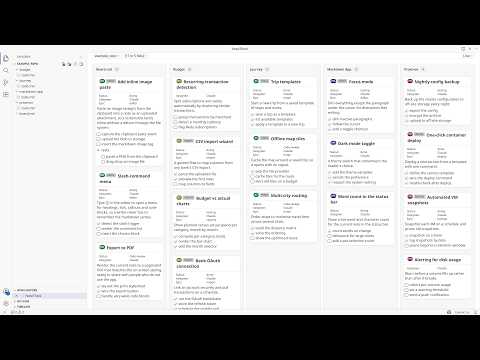
I run nine GitHub repos as one programme of work. Every project keeps its backlog as plain markdown inside its own repo, one Claude Code or ChatGPT Codex session works each project in parallel, and a single board in VS Code shows all of them moving at once. There is no project tool, no API and no sync job in the middle: the markdown file is the shared state that both I and the agents read and write. Step-by-step: 1. Put the backlog in the repo, as markdown. Every project gets `docstech/users/<me>/todo.md` and `done.md`. A story is a `###` heading. Structured fields ride in an empty markdown link at the end of it: `### Add rate limiting [](?status=doing&epic=api&time_estimated=180)`. GitHub renders an empty link as nothing, so the file still reads as prose in a pull request while carrying real metadata. 2. Write the story before the session starts. Each one has goal, background, scope, out of scope, the files it should touch, a checkbox task list, and acceptance criteria. That story is the prompt, and most of my thinking happens there rather than in chat. It decides whether the session comes back with anything shippable. 3. Open the parent folder in one window, and turn the files into a board. I open the parent folder holding all the projects and open any `todo.md` with NoteThink in Folder mode, which merges every markdown file under it into one view. Group the lanes by project and it is the programme view, one lane per repo. Group them by status and it is the delivery view, one Kanban across the whole portfolio. Each card carries a pill naming the project it came from, and clicking it opens that file at that story. 4. Start one Claude Code session per project. Every session opens with the same instruction: read `todo.md` top to bottom and take the top story. The sessions never talk to each other, because the file on disk is the only shared state. A session that dies costs nothing. 5. Let the board report progress instead of reading the sessions. Agents edit the markdown as they work: tick a task, flip `status=todo` to `status=doing`, move a finished story to `done.md`. The board watches the files, so cards animate into their new column as each change lands, and I can see which sessions are advancing without reading any of them. 6. Steer by dragging. Dragging a card between lanes writes the attribute back into the source markdown, so dropping one in "doing" makes the file say `status=doing` and the next agent turn reads it. Ticking a checkbox does the same. The board is the steering wheel and the file is the wire. 7. Close every story the same way. One slash command runs lint plus the full test suite, checks the story's tasks are ticked, and drafts the commit message; another ships to staging then production. The finished story moves to the end of `done.md`. Over time `done.md` becomes the programme record: what shipped, when, and what it cost. Try the board without installing anything. Here is a live example board, four projects merged into one view, and it is exactly what the screenshot shows: https://www.notegit.com/en/app/notegit.com/notegit/example_repo/blob/ai-board/board.md Results, honestly. Nine repos, about 260 open stories and about 1,400 completed ones, all in markdown inside the repos rather than a tracker. The backlog goes back to March 2024; the parallel sessions on top of it are the last four months. I run eight to twelve sessions at the same time, and the whole thing fits inside one Claude Max 20x subscription over a month of full-time work. Not all of it is code. The same parallel-session habit drives a nuclear reactor design study (https://github.com/cleverlight/mistergy) and several video and design projects. The board part fits best where the work already lives as files in a repo. Limits, honestly. The ceiling is my review capacity, not compute. Eight to twelve is where I sit; past that I stop reading output properly and start rubber-stamping, which is worse than running fewer. It only works when stories are genuinely independent, because two sessions in one file is a merge conflict you wrote yourself. Agents occasionally finish work and forget to move the story, so `done.md` needs a sanity check. And it assumes you will write the story properly first, which is real work that AI does not do for you. The screenshot is the public example board rather than my own, because my real one carries client project names. Disclosure: I build NoteThink, the free, open-source VS Code extension in step 3, and NoteGit, which hosts the example board. NoteThink is on the VS Code Marketplace, Apache-2.0, and genuinely early (v0.3.38, preview quality, a handful of installs). The workflow is tool-agnostic and the markdown is just markdown: any viewer will show it, and you can run the whole thing with no extension. NoteThink is what makes the cross-project board and the drag-writes-back-to-file part work.

Alex Stanhope
  • ChatGPT
  • Claude Code
8

Automate Daily Water-Leak Alerts for Rental Properties

I own a rental property where a water leak has occurred roughly every year or two. The leak typically runs for weeks before the water utility detects usage above its threshold. Because billing cycles last three months, the utility may notify me weeks or months after the problem begins. By then, the leak can have produced a bill more than $1,000 higher than the usual $100–$300 amount. The utility offers a one-time, per-account waiver for accidental leak overages. After using that waiver the first time, later incidents are entirely out of pocket. The utility also cannot notify me sooner than when usage exceeds 25,000 gallons during a billing cycle, which moves the account into a quadruple-rate tier for the rest of that cycle. I repeatedly asked whether they could provide an immediate alert when a user-set or company-set daily usage threshold was exceeded, but they said they had no system or solution for it. I tried checking my usage manually every day, but after weeks or months of normal readings, it was easy to become complacent or forget. After receiving another $1,300-plus bill, I asked ChatGPT whether I could automate the process of logging into my utility account, checking usage daily, and emailing me about the prior day’s usage or an overage. ChatGPT suggested several options, including paid AI-agent tools and a free script running on my own hardware. I wanted a completely free, cloud-based solution that would not require my computer to stay on, so I compared the paid options, including Google Spark, with a GitHub-based system. GitHub apparently includes 2,000 minutes of script runtime per month, while my system was estimated to use about 100 minutes. I spent part of a day asking ChatGPT questions, copy-pasting code into GitHub, and refining it. I now have a cloud-based system that logs into my water utility account, checks daily usage, emails me when my daily or seven-day-average thresholds are exceeded, and adds each day’s usage to an Excel spreadsheet for ongoing history. I have verified that it works, and it is set up to keep running and sending alerts without ongoing cost. I had never coded before. The system uses Python, GitHub Actions/YAML, Playwright, pandas, openpyxl, Excel, and Gmail for email alerts. Excel and Gmail were the only tools in that list I had used previously. If I want to change an alert threshold or another setting, I can log into GitHub and ask ChatGPT for the relevant code adjustment. I also added a second rental property in the same city that uses the same water utility. Replicating the process for that property required only a small amount of additional code and took almost no time. I now have a perpetually self-updating, cloud-based water-usage database with daily email alerts for both rental properties, at zero ongoing cost.

Michael Ochoa
  • ChatGPT
  • Gmail
  • Microsoft Excel
2

Convert 16:9 Video to 9:16 Vertical Format with Magnific

I built a workflow that converts landscape (16:9) footage into vertical (9:16) video without heavily cropping the original footage. Using AI tools and a simple node tree in Magnific, I generated the missing visual data outside the original frame so the final video looks as if it was captured vertically. Previously, this felt like too much trouble and too many steps to be worthwhile. Using Magnific Spaces, I extended the first frame of the video to fit a 9:16 frame with one prompt. Then I used a second prompt with the new frame and the original video as references in a video-generation node. I used Seedance 2.0 to save credits because I had low expectations that the workflow would work. To my surprise, the output was great immediately. It was not perfect, but the generated footage matched the original clip very well. Below are images of my node tree. Step-by-step: 1. I opened the original landscape (16:9) video in Magnific. 2. I used one prompt to extend the video's first frame into a 9:16 vertical frame. 3. I added the new frame and the original video as references in a video-generation node. 4. I used a second prompt to generate the expanded vertical footage with Seedance 2.0. 5. I reviewed the output and found that it matched the original clip well, although it was not perfect.

Nicholas Adams
  • ChatGPT
2

Use Claude and ChatGPT to plan and navigate international travel

The Rundown recently held our first in-person retreat in Portugal, which was also my first time traveling to Europe. Claude and ChatGPT were amazing resources throughout the trip, from helping me navigate a chaotic international airport to providing personalized advice on cultural differences, tipping, translating menus, and using public transportation. My wife accompanied me and had plenty of time for solo exploration during the day. She is already a big planner, but a ChatGPT project containing our trip information helped her create a detailed plan, including a packing list, pre-trip checklist, and well-structured day-by-day itinerary for seeing as much of Lisbon as possible. As someone who gets stressed by travel, having an expert with context about my life available in my pocket to answer questions whenever I needed it is something I can’t imagine taking trips without. Step-by-step: 1. I used Claude and ChatGPT for personalized travel guidance during my first trip to Europe. 2. I asked for help navigating a chaotic international airport and handling cultural differences, including tipping, translating menus, and using public transportation. 3. My wife created a ChatGPT project with our trip information to support her planning. 4. She used it to create a packing list, pre-trip checklist, and day-by-day plan for exploring Lisbon during her solo time. 5. I used the tools throughout the trip to answer questions with context about my life and reduce the stress of traveling.

Zach Mink
  • ChatGPT
  • Claude
0

Spot recurring ideas across your conversations with PatternSpeak

I built a small GPT automation called PatternSpeak that periodically looks back across my conversations for ideas, themes, or approaches that keep resurfacing over time. It is not meant to analyze me or turn recurring thoughts into tasks. Its job is much simpler: occasionally say, in effect, “Hey, this idea keeps coming back. Maybe there is something here.” I like it because repetition can be meaningful without being urgent. Sometimes an idea disappears for weeks and then returns in a completely different context. PatternSpeak helps me notice those echoes without forcing them into a productivity system. It feels less like tracking and more like having a friendly observer tap me on the shoulder when a thread has quietly become a pattern. It works very well with the scan and analysis workflow I also shared here. Step-by-step: 1. I use PatternSpeak to periodically look back across my conversations. 2. It identifies ideas, themes, or approaches that keep resurfacing over time. 3. When it notices a recurring thread, it surfaces it as a gentle prompt rather than turning it into a task. 4. I review the recurring ideas and notice whether they have become meaningful patterns, even when they return in different contexts. 5. I use the scan and analysis workflow I also shared here alongside PatternSpeak.

Fien De Waele
  • ChatGPT
2

Use ChatGPT as a last-pass fact-checker before publishing

My first media job was as a fact-checker at a major magazine. Those jobs have already mostly vanished before AI arrived, but now I use ChatGPT 5.4 Thinking as a last-pass fact-checker on my newsletters before I hit send. I'll ask it to identify inconsistencies, isolate the assertions that most need verification, and check key numbers, quotes, and factual claims against original or primary sources. In other words, it does not replace reporting, but it is remarkably good at stress-testing a draft before publication — essentially fact-checking my fact-checking. Step-by-step: 1. I pasted the nearly finished newsletter draft into ChatGPT 5.4 Thinking. 2. I asked it to identify inconsistencies and isolate the assertions most in need of verification. 3. I had it check key numbers, quotes, and factual claims against original or primary sources. 4. I reviewed the proposed corrections and followed the source trail rather than accepting changes blindly. 5. I used the result as a final stress test of my own reporting and fact-checking before publishing.

Jennifer Mossalgue
  • ChatGPT
0

Build a Local Creative Research Database with GPT and PeopleSparkles

I built a workflow called PeopleSparkles for researching people connected to creative fields, schools, collectives, residencies, local art scenes, and cultural networks. The workflow starts from a defined group of people, for example teachers, alumni, artists, current or former members of an association, residents, or associates connected to a specific academy, organization, or cultural scene. A typical research request can be as simple as: “Look at this art website and identify all current and former residents and associates. Build a list. Then research them in batches of ten, checking their websites and other relevant sources, and write a short description of their work. Deliver the results in a format that can be imported into my local database.” Before each new research run, I provide GPT with a ZIP containing the current state of the PeopleSparkles database. This means the research starts from the existing corpus rather than from scratch. New people can be added, existing entries can be expanded, and previously researched people can be recognized before new material is prepared for import. The actual database lives locally on my computer. Apart from the initial development of the code and the research needed to create new lists of people, the database itself runs locally. Once a new batch has been researched and imported, browsing, organizing, scoring, annotating, and using the material does not require the whole corpus to be sent back for analysis. The database also generates a human-readable HTML version with a designed layout, so the research is not trapped inside raw data or spreadsheets. I can browse the people and their notes visually as a small personal research publication, while the underlying structured data remains available for future additions and processing. The “Sparkles” part is personal. I can add my own notes and scores to each person to capture whether their work sparked something in me, and if so, how. That might be curiosity, recognition, inspiration, aesthetic attraction, a strong question, a surprising association, or simply the desire to look again. This means the database does not only record who someone is and what they make. It also records my evolving relationship to their work. Over time, that creates a second layer on top of the research corpus: not just a map of creative people, but a map of resonance. The database also includes a “Surprise me” function that brings up a person from the collection without me choosing them deliberately. This helps break habitual search patterns and allows older, less obvious, or previously overlooked entries to resurface. Someone I barely noticed months ago can suddenly become relevant in a completely different creative context. The purpose is not to create conventional biographies. I am interested in the sparks around a person: what they make, the media and themes they work with, the organizations or people they connect to, and which traces may lead somewhere unexpected. This is particularly useful for creative ecosystems where information is fragmented across artist websites, academy pages, exhibition archives, old posters, association websites, interviews, catalogues, and small cultural organizations. The workflow gathers those fragments into a cumulative research corpus. It also allows the research to grow organically. One artist may lead to a collective, a teacher to a former student, an exhibition to another maker, or an old membership list to someone whose work would never have appeared in a conventional search. In simple terms: existing local database → new source or people list → GPT-assisted discovery and research in batches → import-ready structured data → local database → HTML browsing, notes and scores → surprise rediscovery → new creative connections The result is a living creative research database that combines external research with personal resonance, so I can not only discover people, but also trace which work actually sparks something in me over time.

Fien De Waele
  • ChatGPT
2

A human-led workflow for building software with AI without losing engineering control

This workflow keeps software development human-led while using AI without giving up engineering control. Step-by-step: 1. Inspect the real project: its current behavior, architecture, constraints, repository state, and existing tests. 2. Define one observable outcome, along with acceptance criteria, scope, non-goals, risks, and stop conditions. 3. Decide where the change belongs architecturally before asking an AI assistant to write code. Record consequential decisions. 4. Split the goal into the smallest independently useful, reviewable, and reversible vertical slice. Keep refactoring and unrelated cleanup separate. 5. Give the AI assistant one bounded implementation prompt. Require it to follow existing conventions, add focused tests, report assumptions, and stop if it discovers conflicting requirements or broader scope. 6. Run targeted tests and relevant regression checks. Validate the change in the environment that matters, clearly distinguishing automated checks from manual or real-world acceptance. 7. Have a human review the actual diff, evidence, error paths, security implications, and documentation. AI output remains a proposal until a person accepts it. 8. Update the documentation with the behavior, decisions, limitations, and validation evidence. 9. Create one coherent, reversible commit, then repeat the loop for the next small slice. The complete methodology, reusable prompts, templates, examples, and release checklist are published at https://github.com/d-wendel/human-led-ai-engineering

Don Wendel
  • ChatGPT
  • Codex
3

Build a Pet-Sitting Booking App with Google AI Studio and Claude

A friend who had just started a pet-sitting and dog-walking business asked me to build a booking app. I used Google AI Studio to design the initial prototype. The process was straightforward, and I had a basic working system running within two hours. AI Studio created a Firebase database to store the details and was also effective at designing frontend changes. It published the app for me, and the resulting UI was intuitive. After demonstrating the app, I identified many additional features that needed to be added. This went beyond AI Studio’s capabilities, so I exported the code from AI Studio and started using Claude. I asked Claude to analyze the code and suggest the required changes. Claude identified critical security flaws in the database. I fixed them manually at first, but then realized that Claude could access the Firebase database and fix issues automatically. I continued prompting Claude with additional feature requests, and it built them. There were errors along the way, so I needed to be familiar with Google Chrome’s developer tools to copy the errors and ask Claude how to fix them. I used MailJS for email templates and Resend for email transport. I stored the app in GitHub and allowed Claude to access the repository so it could commit changes automatically. I ran the app locally with npm during development and then hosted it on Vercel. Eventually, I purchased an inexpensive domain name, and the app is currently hosted at Names. One major problem was that when Google AI Studio created the Firebase database, the permissions were locked, preventing me from making administrative changes. I solved this by recreating the database and asking Claude to write the SQL query to set it up. The permissions were still tricky, and I had to continue asking Claude to correct them. Google’s service permissions can be difficult to understand, and finding the correct settings was not always easy. Firebase was also complex to navigate, and getting the permissions configured correctly took time. Once I allowed Claude to connect to the app and its background services through the Google plugin, development became much faster. However, you need to trust the tool carefully and always work on a copy of the live app. Overall, I think app development with Google AI Studio and Claude is impressive. You can create professional apps quickly. I come from an IT support background, though, and I think people who are new to IT may find it difficult to troubleshoot errors without a basic understanding of networking and systems administration. I also built a litter-tracking app using ChatGPT, and it was equally effective. I eventually started using Codex and Claude Code, but I think standard Claude and ChatGPT are more intuitive for nontechnical users. Step-by-step: 1. I used Google AI Studio to create an initial booking-app prototype for a pet-sitting and dog-walking business. 2. I used the Firebase database created by AI Studio to store the app’s details and used AI Studio to design frontend changes. 3. I published the initial app with AI Studio and demonstrated it to identify additional features. 4. I exported the code from AI Studio and asked Claude to analyze it and suggest changes. 5. I addressed the critical database security flaws identified by Claude, first manually and later by allowing Claude to access the Firebase database. 6. I prompted Claude to build additional features and used Google Chrome’s developer tools to copy errors and ask Claude for fixes. 7. I recreated the Firebase database when AI Studio’s locked permissions prevented administrative changes, then asked Claude to write the SQL query to set it up. 8. I used MailJS for email templates and Resend for email transport. 9. I stored the app in GitHub and allowed Claude to commit changes automatically. 10. I ran the app locally with npm during development, hosted it on Vercel, and later purchased an inexpensive domain name that is currently hosted at Names. 11. I connected Claude to the app and background services through the Google plugin, while continuing to work on a copy of the live app.

Anon Ibex
  • ChatGPT
  • Claude Code
  • Claude
5