Workflow Hub

Share your best AI workflow. We could show it to 2M+ people.

Every day, we feature the community's top-voted AI workflow in The Rundown newsletter.

Persistent AI Orchestration with Durable Project State

I use a persistent AI project-orchestration workflow for small-business operations, internal tools, AI-assisted coding, specialist-agent workflows, and projects that need to survive fresh sessions. A root AI receives one bounded objective, reads the project state from files, breaks the work into phases, and delegates implementation to bounded specialist or worker agents. It verifies the results, updates the durable state, and continues until the acceptance criteria are met. This lets me run small-business and coding projects end to end without re-explaining the project every session or manually driving every handoff. The core pattern is: Objective → durable state → root orchestrator → bounded workers → verification → state update → next step → Git checkpoint. Step-by-step: 1. I give the root AI one bounded objective. 2. The root AI reads the current project state from files. 3. It breaks the work into phases and delegates implementation to bounded specialist or worker agents. 4. It verifies the workers’ results. 5. It updates the durable project state. 6. It moves to the next step and creates a Git checkpoint. 7. It continues this cycle until the acceptance criteria are met.

John Fertic
  • ChatGPT
3

Build a Pet-Sitting Booking App with Google AI Studio and Claude

A friend who had just started a pet-sitting and dog-walking business asked me to build a booking app. I used Google AI Studio to design the initial prototype. The process was straightforward, and I had a basic working system running within two hours. AI Studio created a Firebase database to store the details and was also effective at designing frontend changes. It published the app for me, and the resulting UI was intuitive. After demonstrating the app, I identified many additional features that needed to be added. This went beyond AI Studio’s capabilities, so I exported the code from AI Studio and started using Claude. I asked Claude to analyze the code and suggest the required changes. Claude identified critical security flaws in the database. I fixed them manually at first, but then realized that Claude could access the Firebase database and fix issues automatically. I continued prompting Claude with additional feature requests, and it built them. There were errors along the way, so I needed to be familiar with Google Chrome’s developer tools to copy the errors and ask Claude how to fix them. I used MailJS for email templates and Resend for email transport. I stored the app in GitHub and allowed Claude to access the repository so it could commit changes automatically. I ran the app locally with npm during development and then hosted it on Vercel. Eventually, I purchased an inexpensive domain name, and the app is currently hosted at Names. One major problem was that when Google AI Studio created the Firebase database, the permissions were locked, preventing me from making administrative changes. I solved this by recreating the database and asking Claude to write the SQL query to set it up. The permissions were still tricky, and I had to continue asking Claude to correct them. Google’s service permissions can be difficult to understand, and finding the correct settings was not always easy. Firebase was also complex to navigate, and getting the permissions configured correctly took time. Once I allowed Claude to connect to the app and its background services through the Google plugin, development became much faster. However, you need to trust the tool carefully and always work on a copy of the live app. Overall, I think app development with Google AI Studio and Claude is impressive. You can create professional apps quickly. I come from an IT support background, though, and I think people who are new to IT may find it difficult to troubleshoot errors without a basic understanding of networking and systems administration. I also built a litter-tracking app using ChatGPT, and it was equally effective. I eventually started using Codex and Claude Code, but I think standard Claude and ChatGPT are more intuitive for nontechnical users. Step-by-step: 1. I used Google AI Studio to create an initial booking-app prototype for a pet-sitting and dog-walking business. 2. I used the Firebase database created by AI Studio to store the app’s details and used AI Studio to design frontend changes. 3. I published the initial app with AI Studio and demonstrated it to identify additional features. 4. I exported the code from AI Studio and asked Claude to analyze it and suggest changes. 5. I addressed the critical database security flaws identified by Claude, first manually and later by allowing Claude to access the Firebase database. 6. I prompted Claude to build additional features and used Google Chrome’s developer tools to copy errors and ask Claude for fixes. 7. I recreated the Firebase database when AI Studio’s locked permissions prevented administrative changes, then asked Claude to write the SQL query to set it up. 8. I used MailJS for email templates and Resend for email transport. 9. I stored the app in GitHub and allowed Claude to commit changes automatically. 10. I ran the app locally with npm during development, hosted it on Vercel, and later purchased an inexpensive domain name that is currently hosted at Names. 11. I connected Claude to the app and background services through the Google plugin, while continuing to work on a copy of the live app.

Anon Ibex
  • ChatGPT
  • Claude Code
  • Claude
5

Turned my AI coding assistant into a pre-launch security and readiness auditor

Before I ship anything built with AI—whether I use Lovable, Cursor, Replit, or Bolt—I run a security and readiness audit. I ask my AI assistant to clone the free, open-source repo at github.com/edgewiselab/ship-kit and scan my project. It identifies my stack from the code on its own, with no configuration required. The audit checks for 113 known launch mistakes, including open databases, leaked secrets, emails going to spam, missing error tracking, and more. It skips anything that doesn't apply to my app. It generates a plain-English report: green means everything is fine, red means I need to fix something, and amber means I need to confirm it myself. I hand the red items back to my AI assistant to fix, then rerun the scan until the report is clean. The tool is free, MIT licensed, and runs entirely on my own machine. Step-by-step: 1. I ask my AI assistant to clone `github.com/edgewiselab/ship-kit` and scan my project. 2. I let it identify my stack from the code without adding any configuration. 3. I review its checks for 113 known launch mistakes, including open databases, leaked secrets, emails going to spam, and missing error tracking. 4. I review the plain-English report and focus on the red items while confirming the amber items myself. 5. I give the red items back to my AI assistant to fix. 6. I rerun the scan until the report is clean.

Filipe Rodriguez
  • Claude Code
2

Build a Real-Time Cyber Threat Map for IT Onboarding

My company takes cybersecurity seriously, and part of our new-hire onboarding process is a tour of the IT department to meet the team. Our walls have several screens displaying metrics and information from our security tools, firewalls, and other systems. It looks like a scene from a movie. By far, the most popular display is our custom-made Cyber Threat Map, which shows real-time attempts to infiltrate our network, malicious emails, and other security threats we're blocking. The map drives home the reality of what we're facing 24/7 while protecting our employees, vendors, and customers. I built it using Claude Code. It polls a range of devices and systems through APIs, aggregates the data on one screen, and displays attack vectors, location information, and other details from the last 30 days. Step-by-step: 1. I identified the security tools, firewalls, devices, and systems that provide relevant threat data. 2. I used Claude Code to build a custom Cyber Threat Map. 3. I connected the map to the devices and systems through their APIs. 4. I aggregated the data on a single screen, including attack vectors, location information, and other details from the last 30 days. 5. I displayed the map during IT department tours so new hires could see the real-time threats our company is blocking.

John Duval
  • Claude Code
  • Claude
3

Route AI Product Ideas to a Deliberate No

The Rundown Workflow Hub asks members to “share your best AI workflow” and features the community’s top-voted workflows in its daily newsletter. Most posts rightly celebrate workflows that work and produce something useful. This one is about why “no” can also be a successful workflow outcome. A good AI workflow does not turn every idea into a project. It gives an idea the right amount of effort, then produces a clear answer—including a fast, well-documented no. In my first Workflow Hub post, I showed the capture workflow I call ReelForge: turning a useful public Reel, TikTok, or short video into a source-linked research note rather than another forgotten save. This is what happened to one of those notes. A Reel pitched an “AI operating system” for solo consultants: pull together client context, prepare the human before a call, then turn the transcript into follow-up drafts. At first glance, it sounded promising. The mechanism was clear, the problem was real, and the demo had exactly the kind of glossy “one person runs everything” energy that makes it tempting to jump straight to a build. We did not. ReelForge captured the source and separated the useful mechanism from the creator’s bigger claims. From there, a primary routing workflow ran a defined first pass: did the signal merit direct resolution, deeper specialist work, human review, or a reasoned stop? It earned deeper work. Hermes sent the pack into a specialist workflow, where assigned agents collaborated to enrich the evidence, check the market claims, and produce something concrete: a pre-call brief and a post-call follow-up pack. That made the opportunity inspectable rather than another confident paragraph about what an agent *could* do. The enriched pack then went to Jon T for formal review. The review surfaced the problem: Teams and Granola already cover a large part of the obvious transcript, summary, and meeting-preparation wedge. The idea had a workable mechanism, but not a sharp enough reason to become a new product. So the final route was a deliberate no. No unnecessary build. No “let’s just test it” theatre. No orphaned Notion page waiting to become somebody’s future problem. The first visual shows that five-step pass: Step-by-step: 1. Capture the signal. 2. Add evidence and context. 3. Choose the effort. 4. Hand off to human authority when needed. 5. Record the finish. The second visual shows the decision underneath it. A signal can earn direct resolution, a specialist pipeline, or a reasoned stop. Human review is a conditional handoff, not a fourth outcome. That is the rule I care about: the output is not agent text. It is the right next end state. ReelForge was the capture layer in the first post. This is the routing layer that stops captured signals from becoming a very organised pile of work nobody should do. Read my first Workflow Hub post here: https://app.therundown.ai/community/posts/eb787b9d-f7a0-4fe4-8e1d-166bb5c29cb7?ref=db29b880a9904700 Future posts can show the builds that survived this test. This one shows why the test matters first.

Jon T
6

Automate Month-End Close Reconciliation and Reporting in Awish

I recently built a month-end close workflow in Awish for a client at a finance company. The problem was not creating the final report. The real bottleneck was collecting data from different systems, checking what was missing, reconciling totals, chasing exceptions, and getting the report to the right people. I built the entire process in Awish by describing what I wanted. Step-by-step: 1. I opened the Awish chat and wrote: “At every month-end close, collect journal entries, invoices, vendor bills, and financial records from NetSuite together with reporting workbooks from Excel and SharePoint. Check submission completeness, reconcile totals across sources, identify missing data or unusual variances, prepare the management-reporting workbook, send unresolved exceptions to Finance in Microsoft Teams for approval, and once approved export the final report to PDF, store it in SharePoint, and distribute it through Outlook.” 2. Awish understood the request, planned the workflow, and selected NetSuite, Excel, SharePoint, Microsoft Teams, and Outlook for the required steps. 3. I reviewed the plan, connected the client’s accounts, and approved the automation. 4. At month-end, Awish pulls the required financial data and reporting files, checks whether anything is missing, reconciles totals, and flags unusual variances. 5. It updates the management-reporting workbook and sends only the unresolved exceptions to the Finance team in Microsoft Teams. 6. Once Finance approves the exceptions, Awish finalizes the report, exports it to PDF, stores it in SharePoint, and sends it to the authorized recipients through Outlook. The useful part is that Finance no longer has to spend most of the close manually collecting and checking information before making a decision. The repetitive reconciliation work is handled automatically, while the team retains control over unexplained exceptions and the final report. Trigger → Analyze → Approval → Action Month-end close → Reconciliation \u0026 variance checks → Finance approval → Final report \u0026 distribution

Alper Tayfur
  • Microsoft Excel
2

Build a Claude-powered fantasy hockey draft and lineup assistant

I built a fantasy hockey assistant with Claude Code for my Yahoo league. It supports two parts of the league: running our in-person draft and managing my team during the season. For the draft, it runs on my laptop as a live draft board. I enter each pick as it is announced, and the assistant re-ranks the remaining players based on what my roster still needs. The rankings combine projection sources with three seasons of NHL statistics, and each player is scored according to how much they would help in each of our ten categories. The board flags players who will likely be selected before my next pick, identifies injury and regression risks, and opens a detail card for any player with projections, historical data, and a short plain-English assessment. A separate display goes on the TV for the room, showing the pick clock, the next player on deck, and recent picks. After the final pick, the view switches to projected standings for every team, color-coded by category. During the season, I paste in my roster, and the assistant pulls the NHL schedule, starting-goalie reports, and injury news. It suggests the best lineup for each day, ranks free agents by value and by games played that week, and projects my weekly head-to-head matchup category by category. It can also ask Claude to propose a lineup and explain its recommendations, which costs about ten cents per run in API credits. Yahoo’s API is read-only. If it supported write access, I would probably have the app manage my team autonomously. Step-by-step: 1. I built the fantasy hockey assistant with Claude Code for my Yahoo league. 2. During the in-person draft, I run the assistant on my laptop as a live draft board and enter each pick as it is announced. 3. The assistant re-ranks the remaining players based on my roster’s needs, using projection sources, three seasons of NHL statistics, and each player’s value across our ten categories. 4. I use the board’s flags and player detail cards to evaluate likely pre-next-pick selections, injury and regression risks, projections, historical data, and plain-English player assessments. 5. I display the pick clock, next player on deck, and recent picks on a separate TV view, then switch that view to color-coded projected standings by category after the final pick. 6. During the season, I paste in my roster so the assistant can pull the NHL schedule, starting-goalie reports, and injury news. 7. I use that information to set daily lineups, rank free agents by value and weekly games played, and project my head-to-head matchup category by category. 8. When needed, I ask Claude to propose a lineup and explain its recommendations, at a cost of about ten cents per run in API credits. 9. Because Yahoo’s API is read-only, I currently use the assistant for recommendations rather than autonomous team management.

John Duval
  • Claude Code
3

Fix Content Hallucinations in an AI News Digest with Make and Claude

My AI digest looked perfect and was quietly wrong. What actually fixed it. Every run succeeded. Every dashboard was green. And the content was still wrong. My digest invented "AI Moat Brief", a newsletter that does not exist. It reported scan counts nobody measured. It resurfaced week-old stories as fresh headlines. Here is what broke, and what fixed it. The sorting used to happen in my head: skimmed subject lines, unopened tabs, quiet guilt. The Signal is one email at 08:00: a single Make scenario calling Claude Sonnet through OpenRouter. It reads the last 24 hours of my RSS feeds and newsletters, keeps what touches what I am actively building plus the domains I need to stay current in, and arrives in the language I actually think in. Core items end with what it means for my work. Five to ten minutes, and I know where to go deep today. Structurally it looks like this, minus the content, rendered in English for this post (Image 1). No real edition is shown; section names and sample lines are illustrative. The dangerous failures were never pipeline failures. They were content failures, and the cause is structural: an LLM summarizing newsletters that already summarize primary sources is third hand by construction. Every hop strips attribution and adds confidence, and when data goes missing the model fills the gap the way LLMs do: fluently. Valid HTML, confident tone, green pipeline, wrong content. Image 2 is that whole failure class in one frame. Three rules closed the gaps I caught, all live in production: Step-by-step: 1. Verbatim or nothing. A source name is copied character for character, and a link exists only if that exact URL is in the input. The model copies; it never composes. 2. The model never generates metrics. Every count the report shows is injected by the pipeline after the model returns. 3. Recycled news gets demoted. A recap of recaps gets one line at most, and is dropped when the underlying story falls outside the collection window. Rules 1 and 3 lean on the prompt, and that is why the counters exist. The pipeline writes a hidden HTML comment into every email it sends: items, links, urls, cost, finish status. That line caught what I could not see. In one run, the published-links counter and the leftover-urls counter read 45 and 435: the only sign a new cleanup step was a silent no-op. Another morning the model stopped at 15,999 tokens against a 16,000 cap, one token from an email cut off mid-sentence. On the morning I wrote this they agreed, 21 links and 21 urls, and boring is the goal. Image 3 is that morning's actual comment, with the same two counters from the no-op run. The run itself has a dead man's switch on Healthchecks.io, so a missing 08:00 email reaches me before I notice. Honest limits: the $0.31 per report is a fresh measurement I am still validating, and I have not proven these rules hold as the source set scales. There is more behind every part of this; I would rather share it where it is wanted. Ask and I will put it in the comments: the three rules in full, the exact cost and what drives it, what this replaced in my day, how it compares to what is on the market, or the ugliest of the 15 documented bugs. I am sharing this because I doubt I am the only one building fragile things behind the scenes, and monitoring text is harder than monitoring uptime. What content-level checks do you run on LLM output, the kind pipeline monitoring cannot see? Real thresholds and embarrassing failures especially welcome.

Ziv Elbaz
  • Claude Code
  • Claude
  • Gemini
  • Gmail
4

Spot recurring ideas across your conversations with PatternSpeak

I built a small GPT automation called PatternSpeak that periodically looks back across my conversations for ideas, themes, or approaches that keep resurfacing over time. It is not meant to analyze me or turn recurring thoughts into tasks. Its job is much simpler: occasionally say, in effect, “Hey, this idea keeps coming back. Maybe there is something here.” I like it because repetition can be meaningful without being urgent. Sometimes an idea disappears for weeks and then returns in a completely different context. PatternSpeak helps me notice those echoes without forcing them into a productivity system. It feels less like tracking and more like having a friendly observer tap me on the shoulder when a thread has quietly become a pattern. It works very well with the scan and analysis workflow I also shared here. Step-by-step: 1. I use PatternSpeak to periodically look back across my conversations. 2. It identifies ideas, themes, or approaches that keep resurfacing over time. 3. When it notices a recurring thread, it surfaces it as a gentle prompt rather than turning it into a task. 4. I review the recurring ideas and notice whether they have become meaningful patterns, even when they return in different contexts. 5. I use the scan and analysis workflow I also shared here alongside PatternSpeak.

Fien De Waele
  • ChatGPT
2

Automate Daily Water-Leak Alerts for Rental Properties

I own a rental property where a water leak has occurred roughly every year or two. The leak typically runs for weeks before the water utility detects usage above its threshold. Because billing cycles last three months, the utility may notify me weeks or months after the problem begins. By then, the leak can have produced a bill more than $1,000 higher than the usual $100–$300 amount. The utility offers a one-time, per-account waiver for accidental leak overages. After using that waiver the first time, later incidents are entirely out of pocket. The utility also cannot notify me sooner than when usage exceeds 25,000 gallons during a billing cycle, which moves the account into a quadruple-rate tier for the rest of that cycle. I repeatedly asked whether they could provide an immediate alert when a user-set or company-set daily usage threshold was exceeded, but they said they had no system or solution for it. I tried checking my usage manually every day, but after weeks or months of normal readings, it was easy to become complacent or forget. After receiving another $1,300-plus bill, I asked ChatGPT whether I could automate the process of logging into my utility account, checking usage daily, and emailing me about the prior day’s usage or an overage. ChatGPT suggested several options, including paid AI-agent tools and a free script running on my own hardware. I wanted a completely free, cloud-based solution that would not require my computer to stay on, so I compared the paid options, including Google Spark, with a GitHub-based system. GitHub apparently includes 2,000 minutes of script runtime per month, while my system was estimated to use about 100 minutes. I spent part of a day asking ChatGPT questions, copy-pasting code into GitHub, and refining it. I now have a cloud-based system that logs into my water utility account, checks daily usage, emails me when my daily or seven-day-average thresholds are exceeded, and adds each day’s usage to an Excel spreadsheet for ongoing history. I have verified that it works, and it is set up to keep running and sending alerts without ongoing cost. I had never coded before. The system uses Python, GitHub Actions/YAML, Playwright, pandas, openpyxl, Excel, and Gmail for email alerts. Excel and Gmail were the only tools in that list I had used previously. If I want to change an alert threshold or another setting, I can log into GitHub and ask ChatGPT for the relevant code adjustment. I also added a second rental property in the same city that uses the same water utility. Replicating the process for that property required only a small amount of additional code and took almost no time. I now have a perpetually self-updating, cloud-based water-usage database with daily email alerts for both rental properties, at zero ongoing cost.

Michael Ochoa
  • ChatGPT
  • Gmail
  • Microsoft Excel
2

Run Parallel AI Coding Sessions Across GitHub Repos with Markdown

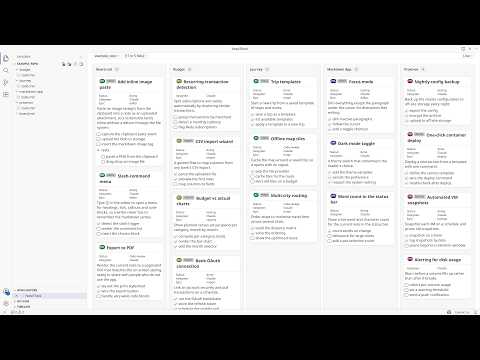
I run nine GitHub repos as one programme of work. Every project keeps its backlog as plain markdown inside its own repo, one Claude Code or ChatGPT Codex session works each project in parallel, and a single board in VS Code shows all of them moving at once. There is no project tool, no API and no sync job in the middle: the markdown file is the shared state that both I and the agents read and write. Step-by-step: 1. Put the backlog in the repo, as markdown. Every project gets `docstech/users/<me>/todo.md` and `done.md`. A story is a `###` heading. Structured fields ride in an empty markdown link at the end of it: `### Add rate limiting [](?status=doing&epic=api&time_estimated=180)`. GitHub renders an empty link as nothing, so the file still reads as prose in a pull request while carrying real metadata. 2. Write the story before the session starts. Each one has goal, background, scope, out of scope, the files it should touch, a checkbox task list, and acceptance criteria. That story is the prompt, and most of my thinking happens there rather than in chat. It decides whether the session comes back with anything shippable. 3. Open the parent folder in one window, and turn the files into a board. I open the parent folder holding all the projects and open any `todo.md` with NoteThink in Folder mode, which merges every markdown file under it into one view. Group the lanes by project and it is the programme view, one lane per repo. Group them by status and it is the delivery view, one Kanban across the whole portfolio. Each card carries a pill naming the project it came from, and clicking it opens that file at that story. 4. Start one Claude Code session per project. Every session opens with the same instruction: read `todo.md` top to bottom and take the top story. The sessions never talk to each other, because the file on disk is the only shared state. A session that dies costs nothing. 5. Let the board report progress instead of reading the sessions. Agents edit the markdown as they work: tick a task, flip `status=todo` to `status=doing`, move a finished story to `done.md`. The board watches the files, so cards animate into their new column as each change lands, and I can see which sessions are advancing without reading any of them. 6. Steer by dragging. Dragging a card between lanes writes the attribute back into the source markdown, so dropping one in "doing" makes the file say `status=doing` and the next agent turn reads it. Ticking a checkbox does the same. The board is the steering wheel and the file is the wire. 7. Close every story the same way. One slash command runs lint plus the full test suite, checks the story's tasks are ticked, and drafts the commit message; another ships to staging then production. The finished story moves to the end of `done.md`. Over time `done.md` becomes the programme record: what shipped, when, and what it cost. Try the board without installing anything. Here is a live example board, four projects merged into one view, and it is exactly what the screenshot shows: https://www.notegit.com/en/app/notegit.com/notegit/example_repo/blob/ai-board/board.md Results, honestly. Nine repos, about 260 open stories and about 1,400 completed ones, all in markdown inside the repos rather than a tracker. The backlog goes back to March 2024; the parallel sessions on top of it are the last four months. I run eight to twelve sessions at the same time, and the whole thing fits inside one Claude Max 20x subscription over a month of full-time work. Not all of it is code. The same parallel-session habit drives a nuclear reactor design study (https://github.com/cleverlight/mistergy) and several video and design projects. The board part fits best where the work already lives as files in a repo. Limits, honestly. The ceiling is my review capacity, not compute. Eight to twelve is where I sit; past that I stop reading output properly and start rubber-stamping, which is worse than running fewer. It only works when stories are genuinely independent, because two sessions in one file is a merge conflict you wrote yourself. Agents occasionally finish work and forget to move the story, so `done.md` needs a sanity check. And it assumes you will write the story properly first, which is real work that AI does not do for you. The screenshot is the public example board rather than my own, because my real one carries client project names. Disclosure: I build NoteThink, the free, open-source VS Code extension in step 3, and NoteGit, which hosts the example board. NoteThink is on the VS Code Marketplace, Apache-2.0, and genuinely early (v0.3.38, preview quality, a handful of installs). The workflow is tool-agnostic and the markdown is just markdown: any viewer will show it, and you can run the whole thing with no extension. NoteThink is what makes the cross-project board and the drag-writes-back-to-file part work.

Alex Stanhope
  • ChatGPT
  • Claude Code
8

Build a Poker Luck Detection App with Claude

I love playing poker, both online and live. One month, I performed poorly. Although it felt like the cards were running badly, I wondered whether I had developed a problem in my game and was blaming my losses on bad luck. I asked around, including asking AI, whether a tool existed that could measure luck from poker hand histories. The unwelcome answer was that it did not. I'm not a coder, but after doing some research into vibe coding, I started building a luck-detection app in a Claude chat. Claude built the UI directly in the chat window and advised me on the formulas I was using to calculate luck for the cards dealt, my performance on the flop, and my performance when I went all in. All three metrics have strong averages, and luck is what varies them. I used a bell curve to model hand outcomes and a Monte Carlo simulator, which Claude suggested and executed, to evaluate all possible outcomes. The result astonished me because it was so useful. I immediately fixed two major leaks in my game and felt better knowing that bad luck really was the main problem affecting my results. I liked the tool so much that I decided to turn it into a full web app with Claude Code, and now an iPhone app that I may let other people use for free. I also had a lot of fun building it—except for learning how to use Xcode. That was a pain, even with step-by-step guidance from Claude. Step-by-step: 1. I reviewed a month of poor poker results and questioned whether bad luck or problems in my game were causing the losses. 2. I researched whether a tool existed that could measure luck from poker hand histories and learned that I would need to build one myself. 3. I used vibe coding to start building a luck-detection app in a Claude chat. 4. I had Claude create the UI and advise on formulas for evaluating cards dealt, flop performance, and all-in performance. 5. I used a bell curve to model hand outcomes and a Monte Carlo simulator to evaluate possible outcomes. 6. I used the results to identify and fix two major leaks in my game and confirm that bad luck was also affecting my results. 7. I expanded the project into a full web app with Claude Code and then began building an iPhone app, working through the added challenge of learning Xcode.

Sanjay Singhal
  • Claude Code
3

AI Agent for Challenge-Focused Industry Article Summaries

As an AI consultant, I need to stay ahead of a landscape that evolves daily by reading dozens of industry articles each week. Manual tech watch quickly becomes a major time sink and pulls me away from client work. I built a specialized AI agent for challenge-focused summarization. Instead of producing generic, passive summaries, it answers two questions for every article: What specific problem, friction, or limitation does the article highlight? What practical solutions, tools, or actionable steps does it provide? The agent strips away marketing hype, introductory fluff, and generic definitions. It identifies the author’s core pain point and produces a quick-read summary focused on actionable technical or business solutions. This turns 15-minute reads into 30-second, high-value digests. By focusing on problem-solving rather than passive reading, the workflow helps me identify practical tools and frameworks I can apply directly to client projects and improve my consulting work. Step-by-step: 1. I provide the agent with a raw article link or the article text. 2. The agent filters out marketing hype, introductory fluff, and generic definitions. 3. It identifies the core pain point, friction, or limitation discussed by the author. 4. It extracts the concrete answers, including practical solutions, tools, and actionable steps. 5. It synthesizes the findings into a quick-read format focused on actionable technical or business solutions. 6. I use the digest to identify tools and frameworks that may apply directly to client projects.

Sebastien Bosse-Platiere
  • Gemini
3

A human-led workflow for building software with AI without losing engineering control

This workflow keeps software development human-led while using AI without giving up engineering control. Step-by-step: 1. Inspect the real project: its current behavior, architecture, constraints, repository state, and existing tests. 2. Define one observable outcome, along with acceptance criteria, scope, non-goals, risks, and stop conditions. 3. Decide where the change belongs architecturally before asking an AI assistant to write code. Record consequential decisions. 4. Split the goal into the smallest independently useful, reviewable, and reversible vertical slice. Keep refactoring and unrelated cleanup separate. 5. Give the AI assistant one bounded implementation prompt. Require it to follow existing conventions, add focused tests, report assumptions, and stop if it discovers conflicting requirements or broader scope. 6. Run targeted tests and relevant regression checks. Validate the change in the environment that matters, clearly distinguishing automated checks from manual or real-world acceptance. 7. Have a human review the actual diff, evidence, error paths, security implications, and documentation. AI output remains a proposal until a person accepts it. 8. Update the documentation with the behavior, decisions, limitations, and validation evidence. 9. Create one coherent, reversible commit, then repeat the loop for the next small slice. The complete methodology, reusable prompts, templates, examples, and release checklist are published at https://github.com/d-wendel/human-led-ai-engineering

Don Wendel
  • ChatGPT
  • Codex
3

Build, deploy, and index a portfolio site with Claude

Claude created my portfolio website in an instant. I prompted it with my links (LinkedIn and social), described what I wanted, and it built the entire thing in one sitting — design, deployment, DNS config, SEO, and Google indexing included. I made a handful of edits across the session, and it handled every single one without friction. When things broke during deployment, it debugged in real time and fixed them via desktop extension browser control. Zero code written by me. Step-by-step: 1. I gave Claude my LinkedIn and social links along with a description of the portfolio site I wanted. 2. I asked it to build the site’s design and content in one working session. 3. I reviewed the result and made a small number of edits through conversation rather than editing code. 4. I had Claude handle deployment, DNS configuration, SEO, and Google indexing. 5. When deployment broke, I used browser control to let Claude inspect the live problem and debug it in real time.

Shubham Sharma
  • Claude
0

Semi-Automate Live Stream Summaries with Gemini, Blender, and Whisper

“A good engineer knows when not to use AI.” I built a semi-automated workflow to summarize my live streams. With it, I can record and edit a stream in just one day of work. Not everyone has time to watch an entire stream, so creating a summary of the main moments is important for people who want to watch it later. Many tools create Shorts from videos by analyzing transcripts, but they are expensive and do not work well for visually heavy content such as gameplay. Gemini can analyze both video and audio and has a long context window, so I decided to use Google AI Studio to identify important moments. I also created scripts to automate parts of the video-editing process. Some of the scripts can be executed by an agent, and the prompts can be turned into Skills when using the API. Step-by-step: 1. I record the video with separate tracks for the microphone and background audio. I keep the microphone on the first track so the LLM does not identify only the background audio. 2. I compress and cut the video with `ffmpeg`, then extract the audio tracks. Google AI Studio has implicit video requirements: files must be under 400MB and under one hour long. The AI analyzes only one frame per second, so I can also lower the FPS to save space. I use the audio tracks later in the workflow. 3. I upload the processed videos to Google Drive, which makes them easier to use in Google AI Studio. 4. I use Gemini with temperature 1 and a high thinking level to select the important moments. I add the system prompt and specify which part of the video I am uploading: "The video is part X of the stream. Please make a structured script according to the system instructions." This helps Gemini understand what types of moments may appear in the video. The system prompt was created for gameplay presentations but can be adapted for other content. 5. I use Gemini Pro with temperature 1 and a high thinking level to find the timestamps for the selected moments. I keep timestamp generation separate from moment selection so Gemini has more thinking time for each task. Gemini Pro works better than Flash when handling time. I add the system prompt along with a copy of the response from the previous step. - As an extra check, after execution I continue the conversation with: "Check if the analysis was cut off too early (context truncation), ignoring that the video continued and generating false positives for timestamps. Check the last events especially." 6. I send the data to Blender. I create a JSON file containing the AI’s response and use a script to add the original video, the microphone track, and the background audio track. The script cuts and marks the important moments based on the JSON. Because it is not possible to send multiple audio tracks from a single video, I send the tracks separately. I also make sure to use the correct FPS, either 30 or 60. 7. I edit the video manually. The AI’s timestamps are not perfect, so I may add or remove sections, or correct a position that the AI identified incorrectly. I then render the video. 8. As an extra, I can automate standardized edits. For example, I use three different camera positions, so I add clips to three different tracks depending on the position I want. I use a script to change the position and scale of the clips on those tracks. 9. As another extra, I transcribe the audio. I mute the background audio and save only the microphone audio as an MP3, then use Whisper to transcribe it. I can use the transcript as YouTube subtitles or embed it directly into the video. I use Whisper-WebUI with Log probability Threshold -0.5, No Speech Threshold 0.5, Patience 2, and Hotwords `\u003cmy name and terms in other languages I usually use\u003e`. I use an LLM to translate the transcript into other languages. 10. Finally, I create tags and titles. I upload the transcript to Google Drive and use it in Google AI Studio with a system prompt to generate tags and titles for the video. I also use the assistant in Google AI Studio to analyze and summarize my channel for use in LLMs. This helps me choose better titles and tags.

Felipe Moreira Ramos
  • Gemini
  • Google Drive
2

Operate Mobile Apps with an AI Agent and Robotic Stylus

AI agents are powerful, but they rarely reach the apps that run daily life. Amazon, Uber, Instacart, Walmart, and DoorDash expose little or no public API access, while simulated input through desktop automation or ADB can leave software fingerprints that anti-bot systems flag. The alternative is to give the agent an arm and an eye and let it operate a phone. The screen becomes the API: a camera watches a real phone, and a robotic stylus taps it. From the phone’s perspective, the input is indistinguishable from a human finger. Nothing needs to be installed, and there is no OAuth setup. Hardware is slower than an API call—each action takes a few seconds—but it can reach virtually any app. Step-by-step: 1. I message the agent like a friend. It has its own phone and its own chat account. 2. The screen lights up, the runtime wakes the agent, and it unlocks the phone and reads my message. 3. The agent works out what I want, opens the right app, and operates it by hand using taps, swipes, and scrolls. 4. If an action involves spending money, the agent pauses and asks for my confirmation. 5. It finishes the task, replies with the result, saves what it learned, and goes back to sleep.

DU DU
  • Claude Code
4

Turn technical documentation into custom podcasts for a run

I've been taking topics I want to learn about (mostly coding docs for new technologies) and giving them to NotebookLM to create customized podcasts for my runs when there aren't interesting podcasts available from the channels I frequent. And it really is actually good and enjoyable, and not just AI slop. Step-by-step: 1. I chose a technical topic I wanted to learn and gathered the most useful documentation for it. 2. I added those sources to NotebookLM instead of relying on a generic podcast. 3. I asked NotebookLM to create a customized audio overview from the material. 4. I listened to the generated episode while running. 5. I repeated the workflow whenever I wanted an engaging podcast for a topic that existing shows had not covered.

Jason Bales
  • NotebookLM
0

Build an Open-Source AI Fitness Tracker with Flutter and SQLite

I built an open-source fitness tracking app in Flutter, but the core workflow is the AI-agent architecture that designed it, built it, and now coaches from its data. For years, I tracked workouts in OneNote. The records were messy, difficult to search, and inconsistent. Excel went out of date as soon as I skipped a week. When I tried chatting with LLMs about my training, the problem was similar every time: no context, no memory, and no awareness of the weights I was using. Each conversation started from zero. The solution has two layers. Gym Tracker is a Flutter app with a local SQLite database that structures workout data properly. It includes 33 pre-populated exercises across 10 muscle groups, separate strength and hypertrophy records, multiple runs with pace, body stats, and full session history. There are no subscriptions, accounts, or cloud dependencies. The database is a file I own. Deschamps is the AI agent that reads the database and knows my full training history. It is not a chat window that forgets between messages; it is a tactician with long-term recall of my personal bests, progression, and injuries. The app stores the data, and Deschamps turns it into decisions. Step-by-step: 1. I defined the data architecture. Fitness data is operational data, so I gave it a schema, a query layer, and an agent that respects its history. I designed a SQLite schema with five tables, proper constraints, and a 10-category muscle taxonomy enforced by a CHECK constraint. 2. I wrote architectural prompts for AI coding agents. I run a team of specialized AI agents using OpenClaw, an open-source agent framework. I act as the CTO agent: I design the systems and delegate implementation to coding agents, including Forge, Cline, and Claude Code. I provide the vision, and they provide the execution. 3. The coding agents built the Flutter app with clean architecture, the repository pattern, Provider state management, and real-time cross-screen refresh. For each iteration, I review the result, refine the prompt, and ship. 4. I designed the database for dual access. The app writes to it, and the AI agent reads from it. They use the same file and schema. In external database mode, the app opens a `.db` file directly, allowing both the app and Deschamps to read and write simultaneously. This creates the bridge between the data layer and the intelligence layer. 5. I shipped the app across Windows, macOS, Linux, Android, and iOS from one codebase. The Android APK is available as a direct download from GitHub. 6. Deschamps reads the database and programs the next session using the full training history. Every session, weight, and body statistic remains structured data without summarization loss. The data is the context. 7. I made everything open source: the app, the agent prompts, and the architecture documentation. My company, Executive Mind (executivemind.io), uses the same agent-first model with seven AI agents and $40/month in total compute, running real operations 24/7. The result is a fitness tracker that remembers everything, an AI coach that never forgets, and a data layer designed from the start for both humans and machines to read. Links: krisracette.me/gym-tracker · github.com/Roughn3ck/gym_tracker · executivemind.io

Rundown Member
  • OpenClaw
1

Build an AI Writing Business Automation System with OpenClaw

I set up an AI assistant to run my entire writing business on autopilot. Every morning, it pulls RSS feeds from more than 30 AI and writing sources, deduplicates them against the previous day’s digest, curates the top items, and sends me a single Telegram message with numbered, linked items before I wake up. At 11 a.m. each day, it generates an original writing craft post. The topic comes from a rotation pool of more than 15 categories, and the assistant avoids anything used in the last 30 days. It also creates accompanying artwork in a rotating fine-art style, then cross-posts the content to Facebook, X, and my blog, including the featured-image upload to WordPress. Each week, it compiles and sends an email newsletter to my subscriber list through Brevo. It pulls from a curated candidates file that I approve before the newsletter goes out. Behind the scenes, the assistant manages a fleet of five servers, including servers for my wife, daughter, and two business colleagues. It handles daily backups, monitors costs across providers, and reminds me when context windows are becoming expensive. The key insight wasn’t the automation; it was the partnership model. My assistant has a persona file (`SOUL.md`) that defines how it communicates, a memory file (`MEMORY.md`) with everything it needs to know about my life and business, and a playbook of behavioral rules built from real mistakes over time. It pushes back on bad ideas, flags risks before executing, and has genuine opinions about craft and content. That shift—from “tool you talk to” to “colleague who has your back”—is what I wrote my book about. *Harnessing the Machine* is the field guide I wish I’d had when I started. It isn’t a tutorial, because the technology changes weekly; it’s a guide to building a working relationship with something that remembers yesterday. The tech stack is OpenClaw, GLM-5.2 as the primary model, DeepSeek V4 Pro as the fallback, and AWS Lightsail. The total monthly cost is under $30. The real cost was calibrating the assistant: teaching it what I care about, what “good” looks like, and when to ask versus when to act. That’s the part most people skip, and it’s why most “AI automation” posts feel like demos rather than relationships. Tools used: OpenClaw, GLM-5.2, DeepSeek, Telegram, WordPress, Brevo Step-by-step: 1. I configured OpenClaw with a persona file (`SOUL.md`), a memory file (`MEMORY.md`), and a behavioral playbook built from real mistakes. 2. I connected it to RSS feeds from more than 30 AI and writing sources and had it deduplicate, curate, and send a numbered Telegram digest each morning. 3. I created a rotation pool of more than 15 writing categories and instructed it to avoid topics used in the previous 30 days. 4. I scheduled it to generate a daily writing craft post, create artwork in a rotating fine-art style, and cross-post the result to Facebook, X, and my WordPress blog with a featured image. 5. I set up a weekly Brevo newsletter that pulls from a curated candidates file I approve before sending. 6. I connected the assistant to five servers, including servers for my wife, daughter, and two business colleagues, and had it manage daily backups, provider costs, and expensive context windows. 7. I configured GLM-5.2 as the primary model, DeepSeek V4 Pro as the fallback, and AWS Lightsail as the hosting environment. 8. I calibrated the assistant by teaching it my standards, what “good” looks like, and when to ask for approval versus acting on its own.

Steve Alcorn
  • ElevenLabs
  • Gmail
  • Nano Banana Pro
  • OpenClaw
2